No products in the cart.
SEO helps search engines understand your website and helps people find the pages most relevant to what they need. This article explains how search works, the main areas of SEO, common mistakes, and simple steps for improving a website.
What is SEO?
Search engine optimization, or SEO, is the work of helping a website appear when people search for something it can answer, provide, sell, or otherwise.
That work happens in several places. You might rewrite a service page to clarify its purpose, improve links between related pages, fix a technical setting that prevents indexing, or publish an article that answers a question your audience is already asking.
SEO is not the same as paying for an advertisement. Organic results come from relevance, usefulness, accessibility, and other search signals. You can improve a page’s chances of appearing, but you cannot buy or guarantee a specific organic ranking through SEO alone.
For example, a local web designer might create a page that explains their website services, who they’re for, what the process involves, and how clients can get started. That page gives search engines clearer information and gives potential clients a better reason to visit.
How SEO Works
Search engines have to do more than match exact words. They need to discover pages, interpret what they’re about, and decide which results best fit a particular search.
1. Discovery
Search engines find pages by following links, reading sitemaps, and revisiting websites. Pages can be hard to discover when they are blocked, broken, poorly linked, or buried deep in the site.
2. Understanding
Search engines analyze a page’s title, headings, content, links, images, and technical settings to understand what it covers. A page can be indexed without ranking well, so being known to a search engine is only the beginning.
3. Matching
When someone searches, the search engine compares the query with pages that may answer it. For example, a search for “how to improve website SEO” suggests an informational guide, while “SEO site audit Kansas City” suggests someone looking for a service.
4. Presentation
The best-matching information may appear as traditional links, local listings, images, videos, products, or AI-generated summaries. SEO helps a page become easier to find, understand, and evaluate, but it cannot guarantee a specific ranking or search feature.
For a website owner, make important pages accessible, clearly focused, relevant to a real question, and useful once someone arrives.
Why SEO Matters
A well-designed website can still be difficult to find. SEO connects a business with people already searching for its services, products, answers, or resources.
That connection can happen at different points in the decision process. Someone might find an article while researching a problem, visit a service page while comparing options, or search for a business when they are ready to make contact.
Traffic is only useful when it reaches the right page and supports the website’s purpose. A better evaluation asks:
- Did the right people find the page?
- Did it answer the question behind the search?
- Was the next step clear?
- Did the visit contribute to an inquiry, booking, purchase, or another meaningful action?
A high-traffic page that attracts the wrong audience may do less for a business than a lower-traffic page that brings in qualified visitors. SEO matters because it helps the right people find the right information at the right point in their decision.
The Main Types of SEO
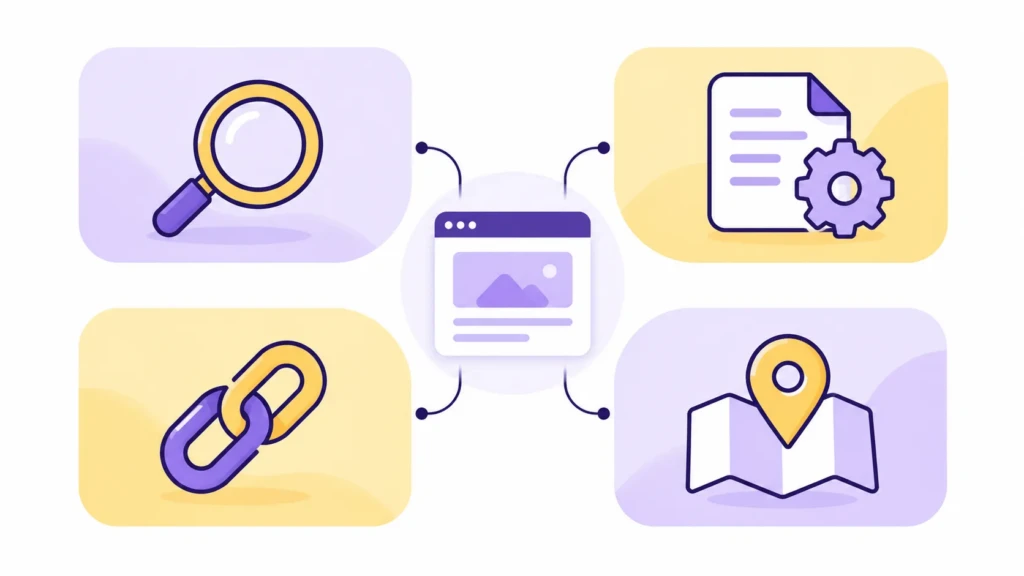
SEO is often grouped into four areas:
- On-Page SEO: improving the content and structure of a page
- Technical SEO: making the site accessible and understandable
- Local SEO: improving visibility for location-based searches
- Off-Page SEO: building relevant connections beyond the website
These categories help organize the work, but they are not separate lanes. A single service page may need clearer writing, stronger internal links, accurate location information, and a technical fix before it can perform well.
On-Page SEO
On-page SEO is the work done on a webpage to make its subject and purpose clearer to both visitors and search engines.
It can include:
- Matching the page to a specific search intent
- Writing a descriptive title and useful headings
- Explaining the topic in plain language
- Using a readable URL
- Adding meaningful internal links
- Describing important images with alt text
- Writing a useful meta description
For example, if someone searches for “how to write a meta description”, the page should explain the task, show what a strong description does, and help the reader apply it.
The title tag, visible H1, and meta description also serve different purposes. The title identifies the page in search results, the H1 identifies its main subject on the page, and the meta description summarizes what someone may find there. Search engines may rewrite the description when another passage better matches the search.
Technical SEO
Technical SEO covers the parts of a website that affect access, interpretation, and usability.
Common areas include:
- Crawlable links and navigation
- XML sitemaps
- Indexing and noindex settings
- Canonical URLs
- Mobile usability
- Page performance
- Secure connections
- Structured data
- Site organization
These details can determine whether search engines can reach and understand important content. A useful page may still struggle if it is blocked from indexing, duplicated across several URLs, missing from the site’s navigation, or hard to use on a phone.
Technical SEO supports strong content. It cannot make an unclear page useful, but it can remove obstacles that prevent good content from being found.
Local SEO
Local SEO helps a business appear when people search for a product or service in a particular place.
It often includes:
- Accurate business information
- A complete and maintained Google Business Profile
- Clear service areas and locations
- Useful local service pages
- Relevant local links and mentions
- A consistent review process
- Matching contact details across important directories
A useful local page explains what the business provides, who it serves, where it operates, and why that location matters.
For example, a local web design page might explain the types of businesses served, the services available, the areas covered, and how someone can start a project. The location should add context, not replace useful information.
Off-Page SEO
Off-page SEO covers activities beyond your website that help people discover and evaluate your business.
Backlinks are one example. A relevant link from a local organization, industry publication, partner, or respected resource can send visitors to your site and add context about your work.
Other examples include:
- Digital PR
- Local sponsorships
- Expert contributions
- Industry partnerships
- Accurate business listings
- Brand mentions
These efforts work best when they reach an audience that cares about your work. A local publication mentioning a business, or an industry resource linking to a helpful guide, is more meaningful than a collection of unrelated links.
Relevance matters more than volume. A few trusted references can support a website more effectively than many links from unrelated sites.
SEO vs. Paid Search
SEO and paid search can both put a business in front of people using search engines, but they work through different systems.
| SEO | Paid search |
|---|---|
| Earns organic visibility | Buys placement through advertising |
| Requires content and website improvements | Requires an ongoing ad budget |
| Builds visibility gradually | Can reach selected searches quickly |
| Rankings are not fully controllable | Targeting, budget, and timing are more adjustable |
| No charge for each organic click | Advertisers commonly pay for clicks or other actions |
A business might use paid search to promote a new service, test an offer, or reach people during a specific period. SEO supports the pages and information a business wants people to find over the longer term.
The two approaches can work together, but neither fixes an unclear service, a weak offer, or a confusing website.
SEO vs. GEO: What Is the Difference?

SEO helps webpages appear in search results. GEO, short for generative engine optimization, describes efforts to make a business or source easier for AI-driven search tools to find, understand, summarize, and cite.
The distinction is mainly about how someone encounters the information:
- Traditional search usually presents a list of webpages, local results, images, or other search features.
- AI search may summarize information first and provide links for people who want to investigate further.
The work overlaps. Clear writing, accessible pages, accurate business information, useful internal links, and trustworthy sources can support both kinds of discovery.
Google’s current guidance says its foundational SEO practices remain relevant to AI features such as AI Overviews and AI Mode. OpenAI similarly explains that ChatGPT search may discover and cite websites when its search crawler can access them and they’re relevant to the question.
For a business, that means focusing on information that is:
- Specific rather than generic
- Easy to verify
- Consistent across important sources
- Clear about services, locations, products, and qualifications
- Written for people instead of stuffed with “AI-optimized” language
GEO is an emerging label, not a guaranteed ranking system. A strong, trustworthy website remains the most useful foundation for traditional search and AI-assisted discovery.
SEO Best Practices That Hold Up
Good SEO starts with the reason someone is searching. Before choosing a keyword, identify what the person wants to learn, compare, solve, find, or buy.
A useful page then follows through by:
- Answering the main question early: Don’t make visitors wade through a long introduction before they reach the information they came for.
- Matching the search intent: A comparison search needs different content from a local service search or a how-to question.
- Making important pages easy to find: Use clear navigation and internal links so visitors and search engines can move through the site.
- Using descriptive page elements: Titles, headings, URLs, and image text should explain what the page contains.
- Keeping technical settings under control: Make sure important pages can be crawled, indexed, and accessed on different devices.
- Updating information when it changes: Review pages when services, products, policies, or best practices become outdated.
- Measuring useful results: Track qualified visits, inquiries, sales, bookings, and other meaningful actions alongside rankings and clicks.
These practices work across traditional search and newer AI-assisted search experiences because they improve the page itself, not just its appearance in one type of result.
Common SEO Mistakes
Many SEO problems come from treating SEO as a checklist rather than an opportunity to improve the website.
Adding a keyword to a title does not fix a page that answers the wrong question. Publishing more articles won’t help if the key service pages are unclear. A technical audit does not fix a weak offer or a confusing next step.
Common problems include:
- Creating several pages that target the same search without a clear distinction
- Repeating keywords until the copy sounds unnatural
- Publishing thin pages that add little beyond existing results
- Forgetting to connect related pages with internal links
- Blocking important pages with incorrect indexing settings
- Measuring impressions without checking clicks or inquiries
- Treating SEO as finished after one setup project
- Pursuing irrelevant links simply because they are easy to obtain
A stronger process starts by deciding what each important page should accomplish. The content, structure, technical setup, and measurement should all support that purpose.
How to Start SEO on a Website

A small website doesn’t need dozens of new articles to start improving its SEO. Start by clarifying what the business offers, who it serves, and which pages help visitors decide.
Review these pages first:
- Homepage
- Main service or product pages
- Important location pages
- Contact, booking, or checkout pages
Each page should clearly state its subject, answer the questions a visitor is likely to have, and provide an obvious next step.
Then check the basics:
- Use descriptive page titles and headings
- Connect related pages with internal links
- Confirm that important pages can be crawled and indexed
- Keep business information accurate
- Make sure the site works well on mobile devices
- Track inquiries, bookings, sales, or other meaningful actions
Once those pages are clear and accessible, add supporting content that answers specific questions your audience is already asking. This creates a stronger foundation than publishing many disconnected articles.
How Long Does SEO Take?

SEO does not follow a fixed timeline. A new page may appear in search relatively quickly, while meaningful traffic and business results can take longer.
The pace depends on the site’s history, competition, technical condition, content quality, and how closely the page matches what people are looking for.
Progress often happens in stages. A page may first be indexed, then earn impressions, then receive clicks from more specific searches. If relevant visitors arrive but don’t inquire, book, or buy, the issue may be the offer, page experience, or next step, not visibility alone.
Track progress through useful signals such as:
- More relevant impressions
- Higher-quality organic visits
- Engagement with important pages
- Inquiries, bookings, sales, or other conversions
- Improved visibility for searches that matter to the business
SEO is ongoing work. Review important pages as the business, audience, competition, and search results change.
Further Resources
The right SEO resource depends on the problem you are trying to solve.
For search fundamentals and official guidance, start with Google Search Central. For information about your own website’s queries, clicks, impressions, and indexing, use Google Search Console.
Other useful areas include:
- Keyword research for understanding customer language
- On-page SEO for improving existing pages
- Technical SEO for crawling and indexing problems
- Local SEO for location-based visibility
- Internal linking for connecting related content
- Analytics for measuring visits and business actions
Use these resources to investigate a specific question or problem. Research is most useful when it leads to clear improvements to the website.
FAQs About SEO
No. A blog can support SEO, but it is not required. Many businesses should first improve their homepage, service pages, location pages, and contact or booking paths.
No. SEO can improve a page’s clarity, accessibility, and relevance, but rankings depend on competition, search intent, site history, and changes in search results.
No. Repeating a keyword a specific number of times does not improve a page by itself. Use clear language that explains the subject naturally and answers the visitor’s question.
Yes. A redesign can change URLs, page content, internal links, navigation, indexing settings, and page performance. Important redirects and search settings should be reviewed before launch.
Track qualified organic visits, engagement with important pages, inquiries, bookings, sales, and other actions that matter to the business. Rankings are useful context, but they do not show the full business impact of SEO.
Summary
SEO helps make a website understandable, findable, and useful. It is not a separate layer that can compensate for unclear services, weak content, or a confusing user experience.
Start with the pages that matter most to the business. Clarify what each page offers, match it to visitors’ questions, connect it to related pages, and confirm search engines can access it.
You do not need dozens of articles to begin. One clear page that helps the right visitor can be more valuable than a large library of disconnected content.
Need Help Deciding What to Fix First?
If your website offers useful services or information but search visibility feels inconsistent, TCB Studio can help you identify the pages, content, and technical issues worth addressing most.
Explore SEO services for ongoing strategy and implementation, or request an SEO site audit when you need clearer priorities.