No products in the cart.
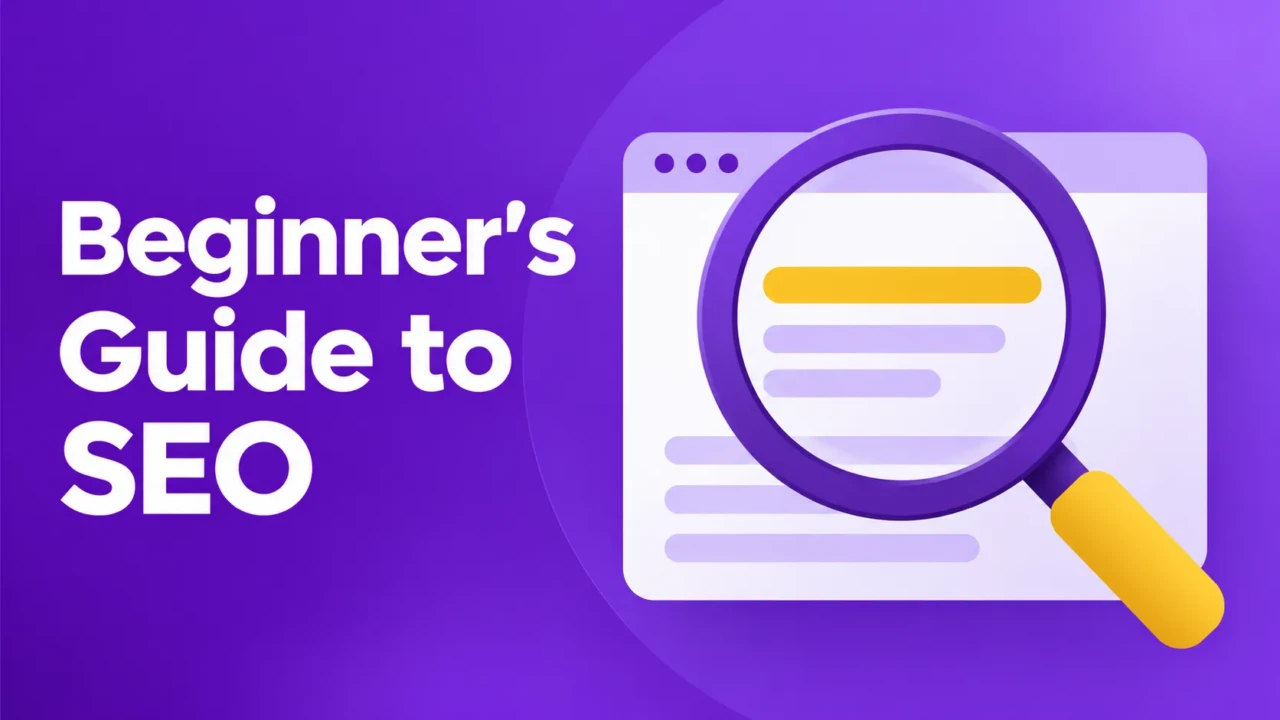
SEO starts with making the right pages easy to find, clear about what they offer, and useful to the people searching for them. To begin, choose an important page, understand the search it should answer, check that Google can index it, and improve the content before expanding to more pages.
This beginner’s guide to SEO walks through that process for a small business website, independent creator, or service provider. You’ll work through a basic sequence, with examples you can adapt to your own site.
You don’t need to learn every SEO term before making progress. You do need access to your website’s content and settings, a clear understanding of your audience, and a way to track what changes.
What is SEO?
Search engine optimization, or SEO, is the work of improving a website so people can find relevant pages through unpaid search results in search engines like Google. It involves the information on your pages, how the website works, how its pages connect, and the references to your business elsewhere online.
A search might lead someone to a service page, a product, a tutorial, or a local business listing. SEO helps connect that person’s need with something useful on your website.
For example, a business owner searching for “website redesign services” needs to understand what a provider offers and whether it suits their project. Someone searching for “how to plan a website redesign” needs instructions. Both searches concern the same subject, but they call for different pages.
Organic search and paid search
Organic search results are unpaid listings selected by the search engine. Paid search placements are advertisements purchased through an advertising system.
You don’t pay the search engine for each organic click, but SEO still requires time, expertise, and maintenance. Buying ads doesn’t purchase better organic rankings.
How search engines find and show pages
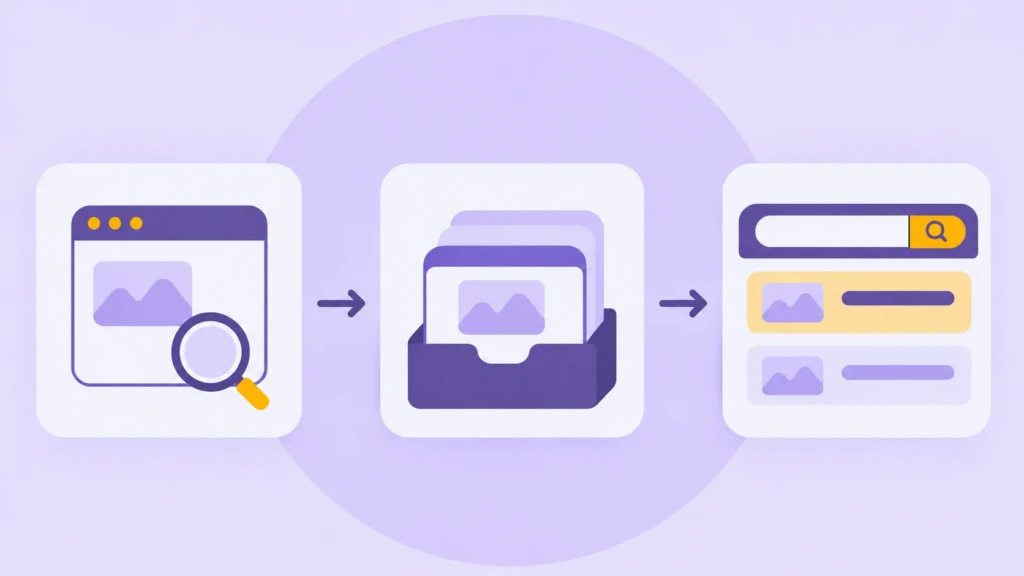
Search engines use automated programs called crawlers to discover and access content. They analyze pages, decide what to include in their index, and select results when someone searches.
Three terms help explain that process:
| Concept | What it means | What it means for your website |
|---|---|---|
| Crawling | A search engine accesses a page to examine its content | Important pages need to be reachable through working links and accessible to crawlers |
| Indexing | The search engine processes information about a page and may store it in its searchable index | Being published does not automatically mean a page is indexed |
| Ranking | The search engine orders results for a particular search | An indexed page still needs to be relevant and useful for the search |
A page can be accessible without being indexed, and indexed without receiving much visibility. This distinction helps you investigate the right problem. An indexing issue needs a different response from a page that appears for searches its content doesn’t answer.
Keywords, search intent, and relevance
A keyword is a word or phrase someone searches for. Search intent is what they want to accomplish by searching, such as learning a process, comparing options, or finding a provider.
Relevance is about how well your page answers that need. Including “website redesign” in a heading helps describe the subject, but a page of general design advice won’t necessarily satisfy someone looking to hire a redesign service.
Useful SEO starts with that relationship between the search, the page, and the reader. Keyword research helps you understand it; content and website improvements help you follow through.
What are the main types of SEO?

SEO is commonly organized into on-page, technical, off-page, and local SEO. These are overlapping areas of work, rather than four independent systems.
A service page may need clearer writing, an indexing fix, stronger internal links, and accurate local business information. Understanding the categories helps you recognize what kind of work a problem requires.
On-page SEO
On-page SEO improves the content and page elements that explain what a page is about. It includes the title, headings, main copy, images, internal links, and how well the content answers the visitor’s question.
On a redesign service page, this might mean explaining what the service includes, showing relevant projects, and describing the process. Adding a keyword to the title is a small part of that work.
Content research and writing fit here too. A page needs a useful answer before its headings or metadata can describe that answer effectively.
Technical SEO
Technical SEO addresses the website systems that affect access, crawling, indexing, and interpretation. It includes indexing instructions, redirects, canonical URLs, sitemaps, and the technical delivery of content.
For example, a helpful service page may be accidentally marked noindex after a website launch. Fixing that instruction removes an obstacle that rewriting the introduction would not solve.
Mobile usability and performance also belong in a technical review. The aim is a website that works reliably for visitors and makes important content accessible to search engines.
Off-page SEO
Off-page SEO concerns discovery and reputation beyond your own website. It includes backlinks, business listings, professional relationships, and coverage from other organizations.
A backlink is a link from another website to yours. Relevant backlinks can help people discover your business and can provide search engines with additional context about your site. A local business association linking to your company or an industry publication referencing your research are basic examples. These links have more value when they come from reputable sources and make sense for the audience.
Do not buy backlinks or participate in schemes created to manipulate search rankings. Google considers buying or selling links for ranking purposes a form of link spam. Google’s current guidance supports the distinction between paid links intended to manipulate rankings and paid advertising or sponsorship links that are properly qualified.
Links bought for advertising or sponsorship purposes should be marked with rel="nofollow" or rel="sponsored" so they do not pass ranking credit. Sites that violate Google’s spam policies may have their rankings reduced or receive a manual action.
Don’t focus on collecting as many backlinks as possible. Instead, try to earn references from sources that are relevant to your business and audience.
Local SEO
Local SEO focuses on searches where location matters. It combines website improvements with accurate business information, relevant local pages, reviews, and a Google Business Profile when eligible.
A web designer serving local clients might explain their service area, show relevant local projects, and keep their contact information consistent. A physical shop also needs accurate opening hours and location details.
International SEO
International SEO helps a website reach people in different countries, regions, or language markets. It involves deciding which audiences the site serves, creating useful localized versions of important pages, and helping search engines understand which version belongs to which audience.
International SEO may include:
- Separate pages or subdirectories for different languages or countries
- Accurate translations and locally appropriate wording
hreflangannotations that connect equivalent language or regional pages- Country-specific products, services, prices, currencies, or contact information
- Internal links that help visitors move between available regional versions
Simply translating a page is not always enough. Searchers may use different terms, expect different information, or have different purchasing requirements depending on where they live. International SEO works best when each version serves its intended audience and the site clearly communicates how the versions relate to one another.
You may also encounter labels such as ecommerce SEO and video SEO. These describe specialized contexts that build on the same foundations.
How does SEO differ from GEO and AI search visibility?
Generative engine optimization, usually shortened to GEO, describes efforts to help information or a business appear in answers generated by AI systems. You may also see terms such as AIO, AEO, AI search optimization, AI search visibility, or answer engine optimization. They all pretty much mean the same thing. Term usage varies, so focus on the work behind the label: improving your AI search results.
SEO and GEO share most of the same foundation. This includes having accessible pages, clear explanations, original information, reliable references, and accurate business details.
The main difference is how the information reaches the reader. A conventional search result directs someone to a page. An AI answer may combine information from several sources and present a summary, with citations or links for further reading.
| Area | Conventional search visibility | AI search visibility |
|---|---|---|
| How information appears | A page listing or another search feature | A generated answer that may mention or cite a source |
| Content goal | Help the visitor answer their question on the page | Make explanations understandable within a broader answer |
| Access | Search engine crawling and indexing | Access and retrieval depend on the AI platform and its crawling sources |
| Measurement | Impressions, clicks, relevant queries, and business outcomes | Citations, mentions, and identifiable referral visits, with attribution gaps |
These experiences overlap. Google Search includes AI-generated answers, so SEO and AI visibility aren’t cleanly separated channels.
What stays the same?
You still need to understand the audience’s question and provide a useful, trustworthy answer. Clear organization, descriptive headings, internal links, and evidence-backed information remain sensible priorities.
Google’s guidance for AI features explicitly says foundational SEO practices apply to AI Overviews and AI Mode. It does not require special AI markup or a new AI text file.
For a beginner, this means the SEO work in this guide also provides a strong starting point for AI search visibility. A separate set of pages repeating the same information is rarely a useful first step.
What deserves additional attention?
AI answers may use a passage from a page without carrying over everything around it. As an editorial practice, make important explanations clear enough to stand on their own.
For example, “It usually takes six weeks” is ambiguous on its own. “For a small business website redesign, our typical project takes six weeks after content and approvals are ready” identifies the service, timeframe, and conditions. That helps readers too; it is not a proven formula for earning AI citations.
Use tables when they make comparisons easier, define unfamiliar terms, and explain where statistics or claims come from. Original examples and specific details give other sources something substantive to reference. None of these formats guarantees selection by an AI system.
Crawler access is another platform-specific consideration. OpenAI distinguishes its search crawler, OAI-SearchBot, from GPTBot, which is associated with model training. A website can allow the search crawler while disallowing the training crawler. Search visibility and permission to use content for training are separate decisions.
Measurement also needs care. A citation may not produce a click, and one answer to one prompt does not establish consistent visibility. Review AI mentions and referral visits alongside qualified inquiries or sales, and don’t treat a handful of prompt tests as a complete performance report.
How much should beginners change their approach?
Treat GEO as an extension of your SEO work. Start with useful content, accessible pages, and accurate information, then investigate platform-specific access and measurement where they matter.
The overlap is substantial, but no established percentage applies across every AI product and website. Claims that all AI bots prefer a particular format need evidence. Use a clear structure to improve understanding, and test additional changes against observable results.
What you need before starting SEO
Before working through the steps, make sure you can edit your website and measure what happens. You can research ideas without that access, but implementing and evaluating improvements requires a few basics.
You’ll need access to page content, titles, and SEO settings, plus someone who can handle technical changes when necessary. Ownership verification for tools may require help from whoever manages your domain or website. If a developer maintains the site, establish how you’ll request changes and keep a record of completed work.
Have a clear description of what you offer, who it serves, and what a successful visit should lead to. Then choose a place to record priority pages, research, and changes. A spreadsheet or Notion page is enough.
An SEO plugin can make some settings easier to manage on platforms such as WordPress. It does not replace research, useful content, or technical judgment, and you don’t need to install several overlapping plugins.
Basic SEO tools worth starting with

Use tools to answer specific questions about your website. Start with search performance and a basic crawl, then add broader research tools when you have a clear use for them.
| Tool | Main use | Starting point |
|---|---|---|
| Google Search Console | Google search performance and indexing | Free; verify your website |
| Screaming Frog SEO Spider | Crawling URLs and inspecting page elements and links | Free desktop version with a 500-URL crawl limit |
| Ahrefs | Audits and search and backlink insights for your own site | Start with a free account with limited access |
| Semrush | Keyword and competitor research, audits, and rank tracking | Paid plans for broader ongoing use |
| PageSpeed Insights | Investigating page loading and responsiveness | Free; test a public page URL |
You don’t need all five running from day one. My starting recommendation is Search Console and Screaming Frog, with Ahrefs as another useful option for reviewing your own site.
How to Get Started with SEO
1. Decide what you want SEO to accomplish
With those concepts in place, choose an outcome that will guide the work.
“Get more traffic” is too broad to guide your first decisions. A local business may need more qualified inquiries for a particular service. A creator selling online may need more people to discover a product that solves a specific problem.
Write one sentence that connects the audience, page, and action:
I want local residents to find my services and book an initial visit.
That sentence tells you where to focus. It also helps you judge whether a keyword or article idea is worth your time.
2. Choose your first pages and record a baseline
Start with three to five pages that matter to the website’s purpose. For a service business, these are often the homepage and main service pages. For a shop, they may be important product and category pages.
Review existing pages before planning new content. A useful answer in a blog post won’t replace a clear service page when someone is ready to convert.
Create a small working list:
| Page | Intended visitor | Main question | Desired action |
|---|---|---|---|
| Kitchen remodeling service | Homeowner with an outdated kitchen | Can this company handle my renovation? | Request an estimate |
| Kitchen remodeling cost guide | Homeowner planning a budget | What affects the project price? | Understand costs and schedule a consultation |
| Kitchen renovation case study | Homeowner comparing contractors | Have they completed a project like mine? | Review the work and request an estimate |
These are illustrative examples. Use pages and outcomes that reflect your actual business.
Set up search measurement
Add your website to Google Search Console and complete ownership verification using a method supported by your platform or hosting setup.
Once data is available, record a baseline for your priority pages: the searches they appear for, impressions, clicks, and the date range. New sites may have little data at first. Google’s Search Console introduction explains the available reports.
Search Console measures search visibility and clicks. To understand what visitors do afterward, use an analytics platform like Google Analytics to track inquiries, bookings, or sales.
Keep a simple change log with the page URL, date, and a short description of your edit. Without that record, it is easy to forget what you changed or credit an improvement to the wrong thing.
3. Check whether Google can index important pages
Before rewriting a page, check whether it is available to search engines. Open it while logged out of your website and confirm that visitors can read the main content without a password or error.
In Search Console, paste the full page address into the URL Inspection tool at the top. Read the indexing status and any explanation provided. The initial report describes Google’s indexed information; the live test checks the current page.
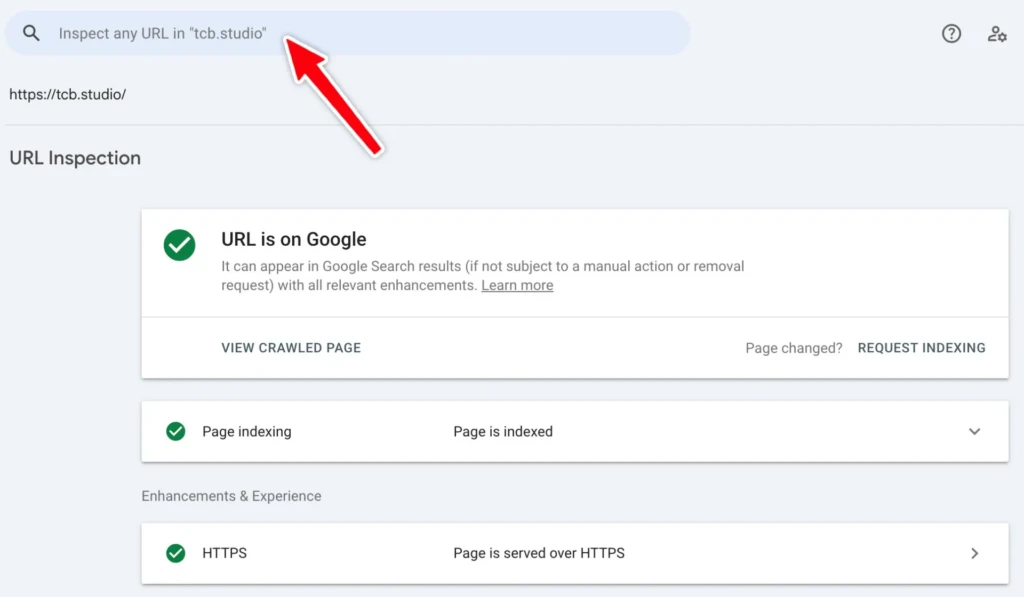
Google’s URL Inspection documentation explains both views. A successful live test does not guarantee indexing or rankings.
Know what needs attention
Some exclusions are intentional. You generally don’t need account pages, checkout pages, or every filtered version of a shop category appearing in search.
For an important public page, investigate these situations:
| Finding | What to check |
|---|---|
| Page requires a login or returns an error | Hosting, access rules, and whether the correct URL is published |
| Page has a noindex instruction | Whether the page or site was intentionally excluded in platform or SEO settings |
| Crawling is blocked | Whether robots.txt, security rules, or hosting settings prevent access |
| Google treats another URL as the main version | Whether duplicates, redirects, and canonical settings match your intent |
| Page is discovered or crawled but not indexed | Whether it is useful, distinct, internally linked, and technically accessible |
Blocking crawling and preventing indexing are different controls. A robots.txt block is not a reliable substitute for a noindex instruction.
Check your sitemap
An XML sitemap lists URLs you want search engines to discover. Your website platform or SEO plugin may already generate one.
Check that it includes the important public pages and submit its address in Search Console if it hasn’t already been submitted. A sitemap helps discovery, but it doesn’t require Google to index every page.
Use the Page indexing report for broader patterns when needed. Focus on important missing pages rather than trying to make the excluded-page count reach zero.
4. Find the searches your audience uses
Keyword research connects your understanding of customers with the language they use in search. A keyword may be a short phrase or a complete question.
Begin with the service, product, or problem behind each priority page. Then write down the questions people ask before taking action.
For a website redesign service, those questions might include whether the site needs rebuilding, how much a redesign costs, how long it takes, and whether existing content can be kept.
Look at intent before search volume
Search intent is what someone is trying to accomplish. A search for “website redesign services” suggests a different need from “website redesign checklist”. Serving this can be more useful than targeting keywords with high search volume, or the number of times people use the search term.
Search several candidate phrases and inspect the results. Are they mainly service pages, tutorials, product listings, comparisons, or local businesses? Results vary by location and time, but they provide useful evidence about the kind of answer expected.
Don’t copy the leading pages’ headings and call the research finished. Identify what the reader needs, what existing results explain well, and what you can add through experience, examples, or a clearer process.
Use tools to refine your choices
Search Console can reveal searches your existing pages already appear for. Keyword tools such as Semrush can suggest related terms and estimate demand and competition.
Treat volume and difficulty scores as estimates. A phrase with modest demand can be valuable when it closely matches your offer. A popular phrase can be a poor choice if its visitors need something you don’t provide.
Group searches that share the same purpose. “Website redesign service” and “business website redesign” may belong on one page, while “how much does a website redesign cost” may justify a separate article.

5. Improve one page from top to bottom
Choose one priority page and work through its content as a visitor. What would you need to know before trusting the information or taking the next step?
For a service page, that may include the scope, intended clients, process, examples, pricing approach, and how to inquire. For a tutorial, it may include prerequisites, steps, screenshots, troubleshooting, and a clear end result.
Write a descriptive title and main heading
The title tag helps identify the page in browser tabs and search results. The H1 is the main visible heading on the page. They should describe the same subject, but they don’t need identical wording.
For a fictional landscaping company, a vague title such as “A Fresh Start” leaves the service unclear. A more descriptive version would be:
| Element | Example |
|---|---|
| Title tag | Landscape Design for Residential Properties – GreenThumb |
| H1 | Landscape Design for Residential Properties |
| Opening paragraph | Explore our landscape design services for residential properties. Plan and build a beautiful outdoor space with planting, hardscaping, and low-maintenance features suited to your home. |
The same approach applies to any service page: make the title specific, match the H1 to the page’s purpose, and explain the service clearly in the opening.
Answer the main question early
Read the first screen of content on a phone. Can a visitor tell what the page covers, whether it applies to them, and why they should continue?
Replace broad introductions with a direct answer. Then use descriptive subheadings to organize the supporting details.
A landscaping service page might explain what’s included, how the process works, what the client needs to provide, and how to get an estimate. Those sections help someone decide.
Add evidence and specific detail
Useful content gives readers something they can evaluate. Include examples of your work, concrete explanations, original screenshots, or relevant sources.
For a case study, explain the initial problem, the work completed, and the observed result. Keep measured outcomes separate from assumptions. For a tutorial, test the steps before publishing them.
There is no reason to pad a page to reach an arbitrary word count. And stuffing a page with keywords can actually harm you when overdone. Add detail where it resolves a real question.
Write the description and review the URL
A meta description is a short summary that search engines may use beneath the result title. Write it as an accurate invitation to the page, with a clear benefit or explanation of what it contains.
For example: “Explore website redesign services for small businesses, including content planning, WordPress development, and a clear process from review to launch.”
For a new page, use a readable URL such as /website-redesign. For an existing page, avoid changing its address just to fit a keyword more neatly. A URL change requires redirects and updates to internal links, so it should solve a meaningful problem.
Make images useful and accessible
Use images that demonstrate something the text discusses. Compress large files, choose appropriate dimensions, and check that important details remain readable on mobile.
Write alt text that conveys the purpose of an informative image. Decorative images can use empty alt text. Avoid filling image descriptions with keywords unrelated to what the image communicates.

6. Connect the page to the rest of your website
A page needs a place within the site. Visitors should be able to reach important content through navigation and relevant links from other pages.
For the redesign service, useful connections might include a link from the main services page, a relevant case study, and an article about redesign costs. The service page can link back to those resources when they help someone evaluate the offer.
Use links that explain the destination
“Read our website redesign process” tells someone more than “click here”. Place links where the destination answers a likely next question.
You don’t need to link every mention of a topic. A few useful connections are easier to follow than a paragraph crowded with competing links.
Internal linking also helps you spot gaps. If a page has no natural connection to your services, products, or other resources, ask why it belongs on the site.
Give overlapping pages distinct purposes
Two pages on the same topic are not automatically a problem. The question is whether they serve different needs.
For example, an accounting firm might publish a short explanation of estimated quarterly taxes and a detailed guide for freelancers. Those pages can complement each other because one answers a basic question while the other supports a specific audience. Two nearly identical guides for small-business tax payments may create maintenance work without giving readers a useful choice.
Before adding a page, decide whether the answer belongs in an existing resource. When consolidating published content, plan redirects and preserve useful information and links.
7. Check mobile use and fix technical obstacles
Open the page on a phone. Read it, use the navigation, follow the links, and complete its main action.
Check whether the text is comfortable to read, buttons are easy to use, images fit, and forms work. A page can look finished on desktop while hiding an important button beneath a mobile overlay.
Use audit reports to find problems, then prioritize
An SEO audit may identify broken links, loading problems, duplicate metadata, or indexing issues. Investigate what the finding means for the affected page before deciding its priority.
A conventional order is:
- Fix problems that prevent important pages from loading or being indexed.
- Repair broken navigation, forms, booking, or checkout.
- Improve content that is unclear or answers the wrong need.
- Address performance and accessibility problems that interfere with use.
- Work through smaller cleanup items.
That order is a starting point. A severe loading problem may deserve immediate attention even when it sits lower in an audit tool’s issue list.
Run an important page through PageSpeed Insights when you need to investigate loading and responsiveness. Use its findings to identify specific work, then retest the affected experience. A higher audit score alone doesn’t establish better search performance.
Structured data is another area where restraint helps. It describes content in a machine-readable format, but it must match the page and applicable requirements. Start with accurate implementation supported by your platform rather than adding every available schema type.
8. Support discovery beyond your own pages
Publishing is only part of making a resource discoverable. Share useful work with existing customers, subscribers, professional contacts, and communities where it answers a real question.
A detailed guide may help a partner organization explain a related topic. An original example, data point, or research finding may give an industry publication a reason to reference your work. These references can bring qualified visitors and help establish your expertise.
Build those opportunities through useful contributions and genuine professional relationships. Do not purchase backlinks or participate in link schemes created to manipulate rankings. Third-party metrics such as authority or domain scores can help compare potential sources, but they are estimates from SEO tools, not Google ranking scores or guarantees of performance.
Add local SEO when location matters
If you serve customers in person or travel to them, review whether the business qualifies for a Google Business Profile. Keep the profile’s categories, hours, contact details, and website accurate, and establish a consistent process for requesting honest reviews.
Google explains that local visibility depends mainly on relevance, distance, and prominence. A complete profile supports the work, but it cannot remove the effect of the searcher’s location.
On your website, explain the services and areas you genuinely serve. Avoid creating dozens of near-identical city pages with only the place name changed.
9. Measure results and choose the next improvement
Return to your baseline and change log. Look for progress on the pages and searches you intended to improve.
In Search Console, filter to a priority page and inspect its queries, impressions, and clicks. Compare equivalent periods, allowing for seasonality, business changes, and the amount of data available.
Average position and click-through rate provide context, but both depend on the searches and result types involved. Avoid treating one sitewide average as a complete assessment.
Use this diagnostic table to help your next investigation:
| What you observe | What to investigate next |
|---|---|
| Important page is not indexed | Access, indexing instructions, duplication, discovery, and content usefulness |
| Page appears for unrelated searches | Whether its purpose, title, and content match the intended audience |
| Relevant impressions grow, but clicks remain low | Search intent, competing results, title clarity, and where the page appears |
| Relevant visitors arrive but rarely inquire or buy | Offer clarity, trust, pricing information, forms, and an obvious next step |
| Page earns useful inquiries | Keep it accurate and explore closely related needs |
These patterns suggest questions, but don’t prove a cause. For example, an increase in impressions can include many new low-position searches, which changes the meaning of the overall click-through rate.
Give changes time to be evaluated
Check immediately for publishing errors, broken links, and accidental access problems. Evaluate search performance over a longer period.
Google notes that changes can take hours to months to appear in search. There is no fixed timeline or guaranteed result.
For a small site, a regular monthly review is a good starting point. Avoid rewriting the same page every few days because its position moved.
Your first month of SEO work
A first month of SEO work should establish a baseline, identify the biggest problems, and improve the pages most likely to support the business. It should not be treated as a promise that rankings or traffic will improve within four weeks. Search performance often takes longer to reflect changes.
Week 1: Set up measurement and audit the site
Start by making sure you can measure what is happening before changing the site.
- Confirm that Google Search Console is connected and collecting data.
- Set up Google Analytics or another web analytics platform.
- Consider Google Tag Manager if you expect to add or manage tracking events later.
- Create a free Ahrefs account and run a site audit.
- Crawl the site with Screaming Frog.
- Record the current status of important pages, traffic, clicks, impressions, and rankings.
Review the first audits for common issues such as:
- 404 errors and broken internal links
- Unnecessary redirects and redirect chains
- Pages that return unexpected status codes
- Missing, duplicated, or overly long title tags and meta descriptions
- Pages that are blocked from crawling or indexing
- Missing canonical tags
- Slow or difficult mobile experiences
- Important pages that are not internally linked
If the site serves a local audience, review the Google Business Profile and major business listings during this week. Check that the business name, address, phone number, website, category, hours, and service information are accurate and consistent.
Week 2: Fix the technical foundation
Use the audit findings to address problems that could prevent search engines from properly crawling, understanding, or indexing the site.
Start with issues that affect multiple pages or important URLs. Clean up broken links, resolve unnecessary redirect chains, correct indexing problems, and improve basic mobile usability. Re-crawl the site after making changes to confirm the problems were resolved.
Do not spend the entire week fixing minor warnings. A small site may have many tool alerts that have little effect on its ability to appear in search. Prioritize errors that affect important pages, user access, crawling, indexing, or page clarity.
Week 3: Improve the most valuable pages
Choose the pages that matter most to the business, such as core service pages, product pages, location pages, or high-value informational resources.
For each priority page:
- Identify the main search query or group of related queries.
- Check what people are actually trying to accomplish with those searches.
- Make sure the page provides the answer, service, or next step they expect.
- Improve the title tag, H1, opening paragraph, headings, and supporting content.
- Add relevant internal links from other pages.
- Make the desired action clear, such as calling, booking, requesting a quote, or purchasing.
Keyword usage should support the page’s subject without making the copy repetitive. A page can mention the right phrase and still perform poorly if it does not satisfy the searcher.
Week 4: Review, improve local signals, and plan the next cycle
Review the work completed during the month and record what changed. Recheck Search Console, Analytics, Ahrefs, and Screaming Frog for signs of unresolved technical issues or early changes in search visibility.
For a local business, complete a more detailed local SEO review:
- Confirm that the Google Business Profile is claimed, accurate, and complete.
- Check the primary category, services, hours, photos, and business description.
- Review the consistency of the business name, address, and phone number across important directories.
- Look for duplicate or outdated listings.
- Identify opportunities to earn relevant local links, mentions, and reviews.
- Use a local SEO platform such as Semrush Local if citation management and listing monitoring would save time.
Do not expect every change to produce an immediate ranking increase. If the site is small and the most important pages have received basic improvements, allow time for the changes to be crawled and evaluated. Continue monitoring Search Console and Analytics as you decide what to focus on next.
After the first month
SEO becomes an ongoing process of:
- Reviewing search and engagement data
- Researching topics and search queries
- Improving existing pages
- Creating new pages when there is a clear need
- Fixing technical problems
- Strengthening internal links
- Improving local listings and visibility
- Monitoring the effect of changes over time
The exact order will vary by site. A site with serious indexing problems may need technical work first. A site with a sound technical foundation may get more value from improving its main service pages or publishing content that answers questions its customers are already searching for.
FAQs about SEO
Can I do SEO myself?
You can handle many initial tasks yourself if you can edit your website and are willing to learn. Start with page clarity, research, internal links, and measurement. Get technical help when a problem involves code, server settings, redirects, or indexing controls you don’t understand.
Do I need paid SEO software?
You can begin with Search Console, your website analytics, manual search research, and a simple working document. Paid tools become more useful when you need broader keyword research, larger crawls, competitor analysis, or ongoing reporting across many pages.
Should I write blog posts before improving service pages?
Start with the pages that explain what you offer and help people take action. Add articles when they answer a distinct question and have a useful relationship to those pages. Publishing frequency is not a substitute for a clear content purpose.
How do I know when to hire someone?
Bring in help when you cannot identify the cause of a problem, the technical work exceeds your experience, or limited time keeps important improvements from being completed. Ask for clear priorities, specific deliverables, and an explanation of how results will be evaluated.
How long does SEO take to work?
Some changes can be noticed quickly, especially when they fix broken links, indexing problems, or unclear page elements. Broader improvements in rankings and organic traffic often take longer, particularly for newer sites or competitive searches. Use Search Console and your analytics platform to monitor changes over time instead of judging the work after only a few days.
Need help with your SEO?
You do not have to manage every part of SEO alone. If you want help understanding what your website needs, start by booking a website consultation. We can review the site, identify the most useful priorities, and discuss a practical next step.
I also offer hourly services for focused projects, audits, technical issues, content improvements, and other SEO or website work. If you need ongoing support, monthly consulting can provide regular help with strategy, content, technical improvements, and measurement.
For a more hands-on starting point, visit the shop for templates and resources that support SEO work. You can also explore the available SEO tools for tasks such as image optimization and on-page SEO optimization.