No products in the cart.
Semrush is one of the most widely used SEO and digital marketing platforms available today. It helps businesses, marketers, and consultants research keywords, analyze competitors, audit websites, and improve their visibility in search results.
If you’ve been looking into SEO, you’ve probably seen Semrush recommended repeatedly. It’s a feature-rich tool, but it’s also expensive and packed with features that many businesses will never use. This guide explains what Semrush does, what it’s best at, how much it costs, and whether it’s the right investment for your business.
What Is Semrush?
Semrush is a subscription-based digital marketing platform that helps businesses improve their online visibility. It combines dozens of SEO, research, and marketing tools, making it easier to understand how your website is performing and where you can improve.
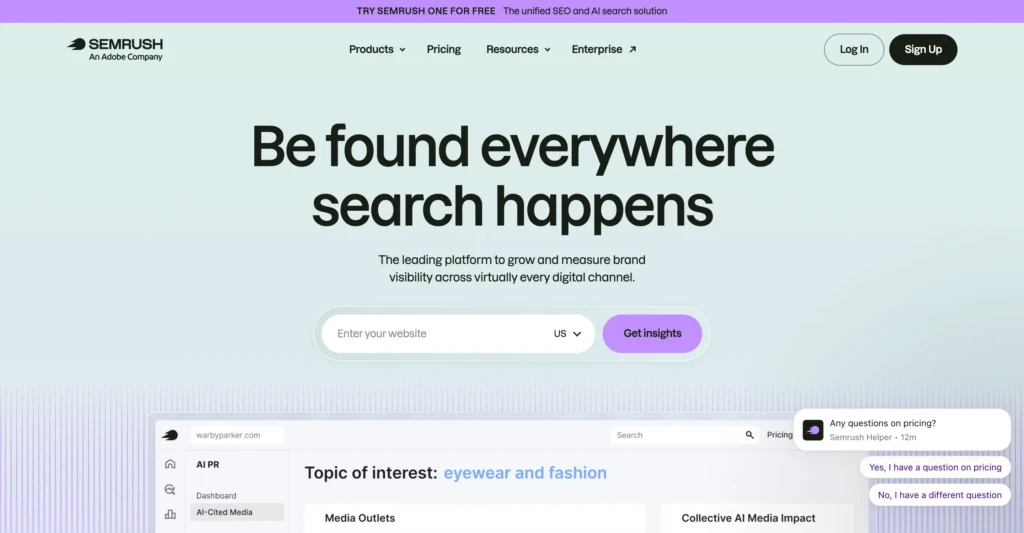
Although it’s best known as an SEO tool, Semrush also includes features for competitor research, website audits, content planning, paid advertising research, local SEO, social media management, and reporting. Instead of focusing solely on SEO, it also includes tools for many aspects of digital marketing from a single dashboard.
It’s used by agencies, consultants, in-house marketing teams, and businesses that actively invest in SEO. While not every feature will be relevant to every organization, its broad feature set is one reason Semrush has become an industry standard.
What Is Semrush Used For?
One of Semrush’s biggest advantages is that it brings together a wide range of marketing tools. While every business uses it differently, these are the features most people rely on.
Keyword Research
Keyword research is one of Semrush’s most popular features. It shows what people are searching for, estimated search volume, keyword difficulty, and related search terms. That makes it easier to build content around topics people are actively looking for, rather than guessing what they want to find.
Competitor Research
Semrush lets you perform competitor analysis to see which keywords competitors rank for, their top-performing pages, estimated traffic, and overall search visibility. It’s a quick way to identify gaps on your own website.
Website Audits
The Site Audit tool scans your website for technical SEO issues like broken links, duplicate content, missing metadata, redirect issues, and crawl errors. Rather than trying to fix everything at once, you can use these reports to focus on the issues most likely to affect your website’s visibility.
Content Planning
Semrush has content tools to help you discover related topics, common search queries, and content ideas based on real search data. This makes it easier to plan articles and landing pages that are more likely to attract organic traffic.
Local SEO
For businesses that serve specific geographic areas, Semrush also offers local SEO tools to manage business listings, track local rankings, monitor reviews, and maintain citations.
I’ve found Semrush Local to be one of the most worthwhile add-ons. Updating business listings manually takes time, and automating that process alone can justify the additional subscription for many local businesses.
Rank Tracking and Reporting
Semrush can monitor your keyword rankings over time, making it easier to measure SEO progress and spot significant changes. Rankings are only one metric, but they provide useful context when viewed alongside traffic, leads, and conversions.
Who Uses Semrush?
Although Semrush is available to anyone, it’s primarily designed for people who actively work on websites and digital marketing. The businesses that get the most value from it tend to use it as part of their weekly workflow rather than as an occasional research tool.
Semrush is commonly used by:
- SEO agencies
- Marketing consultants
- In-house marketing teams
- E-commerce businesses
- Local businesses investing in SEO
- Content publishers
If you’re a small business owner, don’t assume you need the same software your marketing agency uses. Professional SEO tools are designed for frequent use, which is one reason they’re priced the way they are.
Why Is Semrush So Popular?
Semrush has become one of the most widely used SEO tools because it combines dozens of marketing tools. Instead of relying on separate software for keyword research, competitor analysis, technical audits, rank tracking, and reporting, businesses can manage much of their SEO work from one place.
One reason people choose Semrush is the depth of its data. It tracks millions of keywords, websites, and backlinks, making it much faster to research competitors, discover content ideas, and identify SEO opportunities.
It’s also become an industry standard. Because so many agencies, consultants, and in-house marketing teams use it, you’ll find plenty of tutorials, documentation, and training resources online.
Its popularity doesn’t mean it’s the right choice for everyone, though. Many small businesses use only a handful of features, making the monthly subscription difficult to justify. Before signing up, consider whether you’ll actually use the tool often enough to get your money’s worth.
Semrush Pricing: Is It Expensive?
Semrush is one of the more expensive SEO suites on the market, with plenty of upcharges. It’s designed for agencies, consultants, and businesses that actively invest in SEO, so its pricing reflects that.
It offers multiple subscription tiers, with higher plans increasing limits for projects, tracked keywords, reports, and other features. Some products, including Semrush Local, are also sold separately, so it’s important to understand what’s included before subscribing.
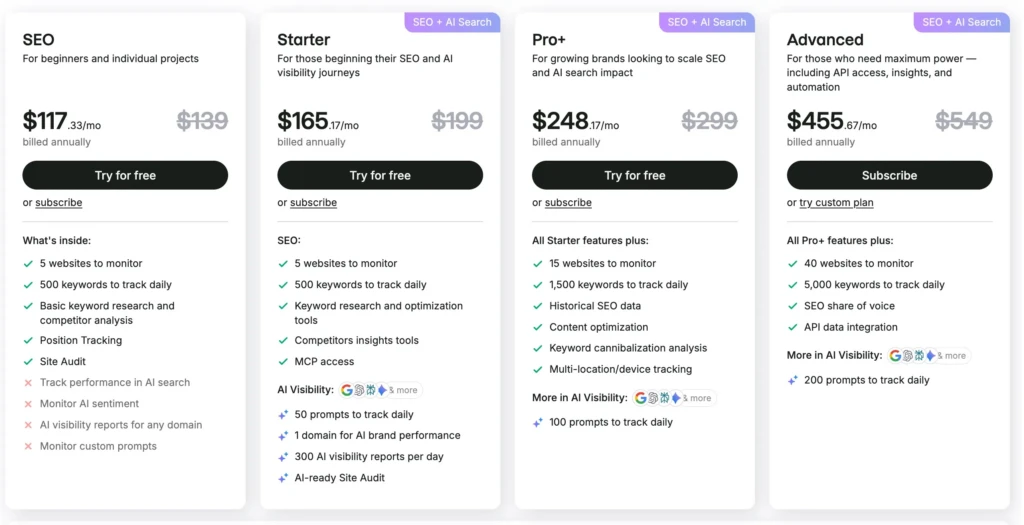
For many small business owners, the monthly cost can be difficult to justify. If you only perform keyword research occasionally or run a website audit once or twice a year, you probably won’t get enough value from a full subscription.
Businesses that rely on SEO often recover the cost through time savings and better decision-making. Agencies, in-house marketing teams, and companies that publish content regularly are far more likely to use Semrush enough to make the investment worthwhile.
I’ve found Semrush Local to be one of the better values. Keeping business listings and citations up to date manually is tedious, especially if your information changes. Being able to manage everything from one dashboard can save hours of repetitive work.
Pros and Cons of Semrush
Like any professional software, Semrush has clear strengths and tradeoffs. Here’s where it stands out, and where it may not be the right fit.
Pros
- Comprehensive SEO toolkit with keyword research, competitor analysis, technical audits, rank tracking, and reporting.
- Excellent competitor research that can uncover opportunities.
- Large keyword and backlink databases backed by years of historical data.
- Semrush Local simplifies citation management, listing updates, and review monitoring for local businesses.
- Regular updates continue to expand tools into AIO.
Cons
- One of the more expensive SEO suites, especially once add-ons are included.
- The number of features can be overwhelming for beginners.
- Traffic, rankings, and other metrics are estimates rather than exact measurements.
- Smaller businesses may only use a fraction of the available tools.
- Some useful features, including Semrush Local, require an additional subscription.
The biggest question isn’t whether Semrush is good. It’s whether you’ll use enough of it to justify the monthly cost.
Is Semrush Worth It?
Semrush can be a good investment, but only if you use it regularly. It is designed for ongoing SEO work, not occasional keyword searches or occasional website audits.
It’s Probably Worth It If…
- You run an agency or manage multiple websites.
- SEO is a major source of leads for your business.
- You publish content consistently.
- You regularly research competitors and monitor rankings.
- You want to simplify local SEO management.
The more often you use Semrush, the easier it is to justify the subscription.
It May Not Be Worth It If…
- You only need keyword research a few times a year.
- Your website rarely changes.
- SEO isn’t a significant marketing channel for your business.
- You only want an occasional website audit or strategy review.
In these situations, working with an SEO consultant as needed is often more cost-effective than maintaining an ongoing subscription.
Ultimately, Semrush is a research tool, not an automatic SEO solution. It won’t improve your rankings simply because you have an account. The value comes from applying the insights it provides to consistently improve your website.
Semrush Alternatives
Semrush isn’t the only SEO software available. Depending on your budget and priorities, one of these alternatives may be a better fit.
Ahrefs
Ahrefs is Semrush’s closest competitor and is especially well known for its backlink analysis. It also offers excellent keyword research, competitor analysis, and site auditing tools. The two platforms offer many of the same features, so the choice often comes down to personal preference and workflow.
Moz Pro
Moz Pro offers a smaller feature set with a gentler learning curve. It’s a good option for businesses that want solid SEO tools without the complexity of a larger toolkit.
Google Search Console
Google Search Console is a free tool that provides search performance data directly from Google. It shows which queries drive traffic to your website, highlights indexing issues, and reports technical problems. While it lacks competitor research and keyword discovery tools, every website owner should have it set up.
Quick Comparison
| Tool | Best For |
|---|---|
| Semrush | All-around SEO, competitor research, content planning, and local SEO |
| Ahrefs | Backlink analysis and technical SEO |
| Moz Pro | Simpler SEO management for beginners |
| Google Search Console | Free search performance and indexing data |
If you want the broadest all-in-one platform, Semrush is still one of the strongest choices. If analysis is your priority, Ahrefs has the edge. If you’re looking for a simpler experience, Moz Pro is worth considering. Regardless of which paid platform you choose, Google Search Console should always be part of your SEO toolkit.
My Experience Using Semrush
I’ve used Semrush for years across client websites, ranging from local service businesses to e-commerce stores, and I still use it regularly. While the platform includes dozens of tools, I spend most of my time using just four: keyword research, competitor analysis, site audits, and rank tracking.
Those four tools answer most of the questions I have when starting an SEO project. Which keywords are worth targeting? Who are the real competitors? Are there technical issues holding the site back? Where are the biggest opportunities?
I also subscribe to Semrush Local because it removes one of the most tedious parts of local SEO. Instead of updating business information across dozens of directories individually, I can manage it from one dashboard. For businesses that rely on local search, that alone can justify the additional subscription.
You don’t need to use every feature to get value from Semrush. Like most professional software, you’ll naturally gravitate toward the tools that fit your workflow. Don’t worry if you never use every feature. Focus on the features that help, and ignore the rest.
Putting This Into Practice
Semrush is one of the best-known SEO platforms for a reason. It can help you uncover keyword ideas, understand your competitors, fix your website’s technical health, and monitor your search performance over time.
That doesn’t mean every business needs a subscription.
If SEO is a major part of your marketing strategy, or you regularly publish content and compete for search traffic, Semrush can become an invaluable part of your workflow. On the other hand, if you only need occasional keyword research or a yearly website audit, you’re unlikely to get enough value from paying for it every month.
For many businesses, that investment is well worth it. For others, working with an experienced SEO consultant when you need research or strategic guidance may be the more practical and cost-effective approach.
Work With TCB Studio
SEO tools are only as useful as the decisions you make with them. If you’re not sure where to focus, it’s easy to spend time fixing low-impact issues while bigger issues go unnoticed.
At TCB Studio, I help businesses turn SEO data into actionable improvements through website audits, keyword research, technical SEO, local SEO, and content strategy. I can help you prioritize the work that’s most likely to move your business forward.