No products in the cart.

Google Maps is not just a navigation tool. It’s a critical component for businesses looking to drive local traffic to their physical locations.
This guide focuses on Google Maps from an SEO perspective, as it is essential for local search and businesses. Read more to get started.
Google Maps and SEO
Google Maps plays a large role in Local SEO and drives many valuable listings in SERPs. When local businesses have accurate, complete listings, searchers and potential customers can find, visit, and purchase from them more easily.
Even for businesses that operate largely online, a well-optimized Google Maps listing can lend credibility and tangibility to their operations.
Furthermore, Google Maps’ multimedia capabilities, such as high-quality photos and virtual tours in search results, provide an avenue to engage a wider audience. Visual cues can add context and depth to content, making it resonate more and drive more traffic.
Importance of Google Maps SEO
People frequently rely on online maps to guide their purchasing decisions, and Google Maps is the sorcerer supreme in this realm. Here’s why:
- Boost Local Visibility: When potential customers search for the services or products you offer, an optimized Google Maps listing helps them find you more easily.
- Drive Traffic: Being prominently displayed in local search results increases the chances of clicks to your website and visits to your physical location.
- Build Trust: A well-maintained listing with positive reviews can establish trust. When customers see others vouching for your business, they’re more likely to choose you over others.
- Increase Engagement: An optimized Google Maps listing makes it easier for customers to engage. All the information is available, whether they want to call, get directions, or visit your website.
- Stay Competitive: If your competitors are leveraging Google Maps SEO and you’re not, you’re handing them a significant advantage. Keeping up ensures you don’t miss out on potential business, as SEO is a long-term strategy that requires consistency.
Google Maps is not just about being found; it’s about being chosen. An optimized listing can set you apart from competitors and improve your online presence.
Setting Up Your Google Business Profile
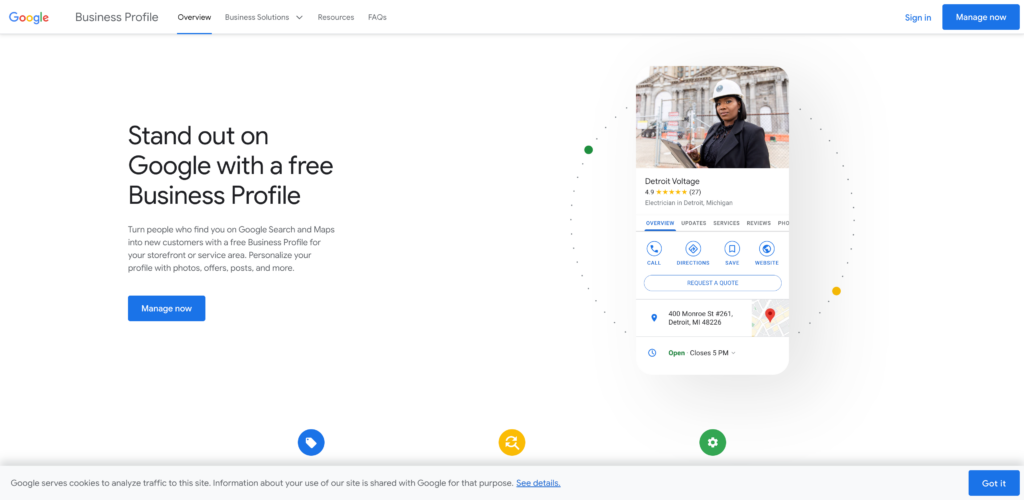
Google Business Profile is the backbone of Google Maps listings. It allows you to create a business profile, making your business discoverable to local customers.
You can see Google’s official instructions for full details, but here are the main steps:
- Create a profile with your Google account. Use a business email!
- Fill out your basic information. This includes your business name, address, and phone number.
- Verify your business through one of their verification options.
Once that’s complete, you can work on getting the most out of your listing.
Optimizing Your Business Profile
Creating a profile is only the beginning. Proper optimization is the key to standing out in local searches and attracting more customers. Follow these steps:
- Use High-Quality Images: Upload clear, high-resolution photos of your business. This includes the exterior and interior of your location, product shots, team photos, and events. The main image or profile photo should best represent your business.
- Complete Every Section: Google favors more complete profiles. Complete every section, as each piece of information plays a key role in your business’s visibility.
- Select Relevant Categories: Be precise when selecting your business categories. While you’ll choose a primary category, don’t forget to consider additional categories that might apply.
- Gather More Reviews: Encourage your customers to leave reviews. Engage with them by responding to both positive and negative feedback.
- Add Posts: Share updates, offers, events, and news directly on your profile. See Google’s tips for creating a high-quality post for your listing.
- Ensure Consistency: Your name, address, and phone number (NAP) should be consistent across all online platforms and assets, not just on your Google profile.
- Add Attributes: Google lets you add attributes that provide more information about your business, such as “Free Wi-Fi” or “Wheelchair accessible”. Update these as needed.
- Check for Duplicates: Duplicate listings can confuse potential customers and hurt your rankings. Ensure there’s only one, authoritative listing for your business.
- Use Booking Features: If applicable to your business, enable the built-in booking feature so customers can book appointments directly from your profile. You can check what apps they support and find options that work for you.
- Update Regularly: Keep all information up to date. Whether changing hours for a holiday, introducing a new product, or relocating, make sure your profile reflects current details.
While the initial setup of your Google Business Profile is essential, consistent optimization and engagement are the real secrets to local SEO success.
How to Rank Better in Google Maps
Achieving a higher rank on Google Maps is every local business’s aspiration. After all, the closer your business is to the top, the more visibility and potential customer traffic you’ll get. Google offers its own tips on improving performance, but let’s go into detail and cover more essentials.
1. Optimize Your Google Business Profile
Make sure all information in your profile is complete, accurate, and consistent with your other online info, such as what’s on your website.
Otherwise, follow the earlier steps for more details.
2. Generate Genuine Reviews
Encourage satisfied customers to leave positive reviews. Responding to these reviews, whether positive or negative, signals to Google that you’re actively managing your profile.
3. Ensure Consistent NAP (Name, Address, Phone Number)
Like most things with SEO (and life, really), consistency is key. Ensure your NAP is consistent across all online platforms and directories.
4. Build Local Citations
Having your business listed on local directories, websites, and platforms can boost your local SEO. Popular platforms include Yelp, Yellow Pages, and TripAdvisor; however, what’s right for you will depend on your business.
5. Create Local Content
Having a blog that covers local events, news, or activities can make your website more relevant to local searches. This is typical SEO and content marketing work, the kind that indirectly boosts your online presence.
6. Build Quality Backlinks
While this is an essential aspect of general SEO, backlinks from authoritative websites in your area or niche can drive a steady stream of traffic and typically boost your local rankings. Think of them as votes of confidence for your business.
7. Monitor and Adjust
Regularly checking your profile and its performance can provide insights into what’s working and what isn’t. Monitor your efforts and adjust to achieve optimal results and ROI.
Local SEO Tools
Optimizing your Business Profile requires attention to detail, consistent updates, and keen insights. Fortunately, several tools are designed to help you with this task and elevate your local SEO strategy. Let’s delve into some top choices:
- Moz Local: A Moz product, this tool ensures your business listings are accurate, consistent, and visible across the web. It generates and manages listings for you, saving time and effort, especially if you’re getting started with local SEO.
- Semrush: While renowned as a comprehensive SEO tool, Semrush also offers local SEO features, including listing management and position tracking. It’s versatile and useful for those who want insights beyond local SEO.
- Ahrefs: This is another popular SEO tool that can be quite versatile. It offers high-quality keyword data and other insights to support improvement.
While tools can provide data and assist with tasks, your strategy and how you act on this information are what truly make the difference.
Bottom Line
Google Maps SEO is crucial for local businesses. By ensuring your Google Business Profile listing is optimized and staying proactive with reviews and updates, you set your business up for success.