No products in the cart.

What is Traffic Potential (TP)?
Traffic Potential (TP) is an SEO metric developed by Ahrefs that estimates a web page’s total organic traffic.
Here’s how Ahrefs describes TP in their interface:
Traffic Potential shows the sum of organic traffic that the #1 ranking page of your target keyword receives from all the keywords it ranks for.
Ahrefs’ Keywords Explorer tooltip
It’s important to note that TP is an estimate and not a traffic guarantee. Actual traffic to a page will vary based on many factors, including changes in search demand, ranking fluctuations, SERP updates, and keyword click-through rates.
Also, traffic potential numbers are cached values based on snapshots of the last known data. As such, you might notice inconsistencies across the Ahrefs, but they’re nothing to worry about.
Keyword Research Example
Let’s walk through a scenario of how Traffic Potential works in a keyword research process to understand the metric better.
Pretend you’re an LA-based ramen shop owner who wants to figure out what keywords to target in Google to attract more customers.
The keyphrase “Los Angeles ramen” has a search volume (how many times it gets searched in a month) of 80 but a 2,800 Traffic Potential:
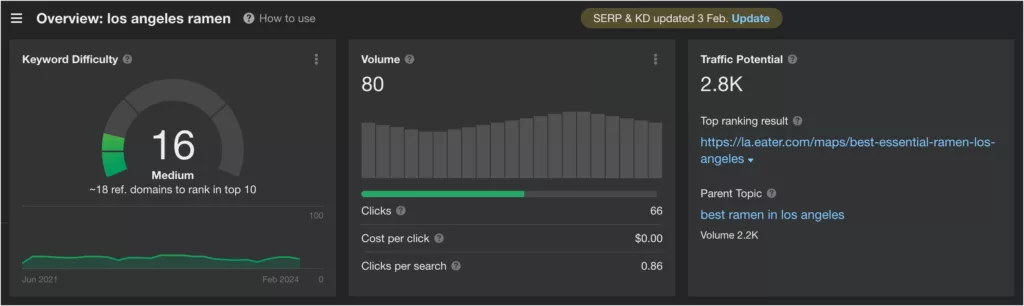
That’s a huge difference! According to Ahrefs, the top-ranking page has much more traffic than ranking #1 for “Los Angeles ramen” could provide with 80 search volume.
Let’s examine the traffic data for the top-ranking result by clicking on the arrow next to the URL and selecting Organic keywords:
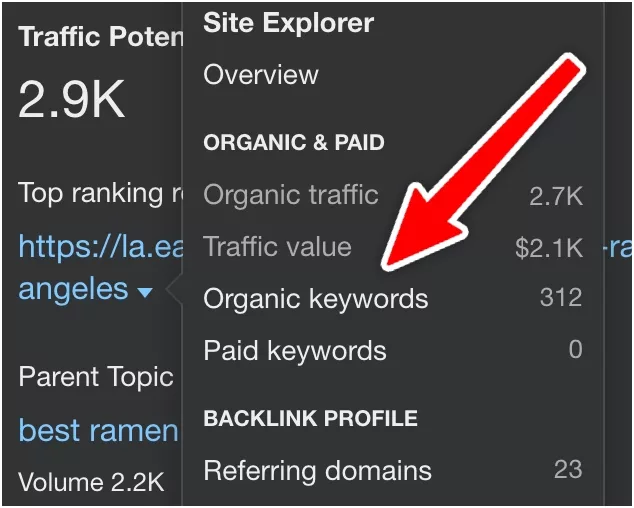
This will lead to the Organic keywords report for the page:
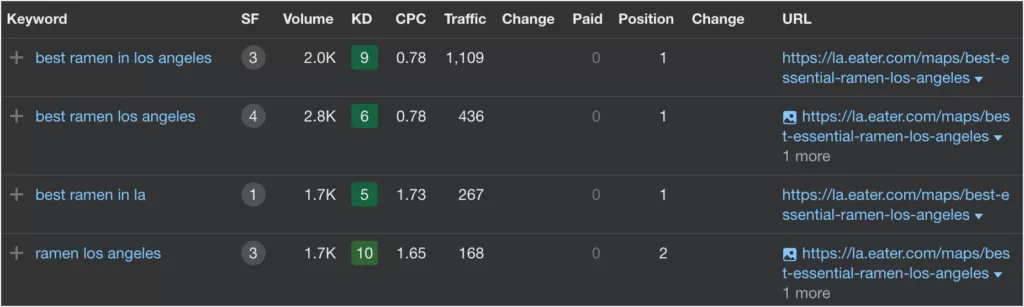
From this, we can see the page gets most of its traffic from “best ramen in Los Angeles”, which has a search volume of 2,000 and a keyword difficulty of 9.
By comparison, the original keyword, “Los Angeles ramen”, had a volume of 80 and a 16 difficulty rating, making it a considerably worse target by these metrics.
As you can see, Traffic Potential can be a useful tool for SEO efforts that include considerations beyond keyword volume and difficulty.
How to Use Traffic Potential
Traffic Potential is valuable for prioritizing content that could drive the most organic traffic. Here are some tips for using it in your SEO strategies:
- Identify high-potential keywords. Use TP to identify the most promising keywords and how they relate to the existing top results.
- Analyze competitors. Examine your competitors’ high-traffic pages to see what keywords drive their traffic. Use this research to identify your content gaps.
- Prioritize efforts. Focus on creating or optimizing content for high-TP keywords that align with your audience’s interests and needs.
- Combine with other metrics. Use TP alongside keyword difficulty and search volume to identify better keyword targets.
- De-prioritize low-value keywords. Traffic Potential can reveal that a keyword might not be worth targeting, and efforts might be used better elsewhere.
Bottom Line
Traffic Potential (TP) is an Ahrefs metric that estimates a page’s organic traffic. It can be a useful tool for keyword research and identifying the best keywords for your SEO campaigns.
However, it’s an estimate, not a promise. Use TP to create a more rounded strategy, not as an expectation of success.








