No products in the cart.
Automation is a powerful productivity tool. Zapier is a popular solution for automating tasks and workflows through many popular apps. This guide covers the basics.
What is Zapier?
Zapier is a cloud-based platform that connects and automates tasks between different web apps, making workflows easier and more productive. Zapier’s interface lets you create automated workflows called “Zaps” to streamline repetitive tasks.
Zapier Features
- Zaps: Set up automated workflows between popular apps
- Multi-Step Zaps: Create complex workflows with multiple actions
- App Integrations: Connect 5,000+ apps, including ClickUp, Slack, and Google Sheets.
- Filters: Define specific conditions to trigger actions
- Formatter: Formats data according to your instructions
- Scheduling: Set up actions to run at specific times
- Task History: Track and manage previous tasks
- Versions: Manage different states of your Zaps
- Autoreplay: Will retry automation if they fail under certain conditions
- Paths: Logic rules for your automation workflows
Pricing
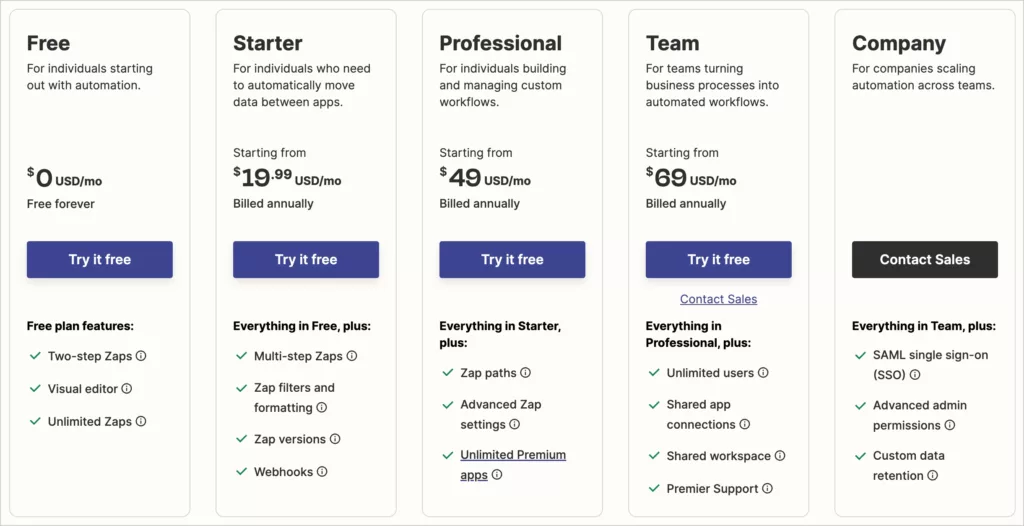
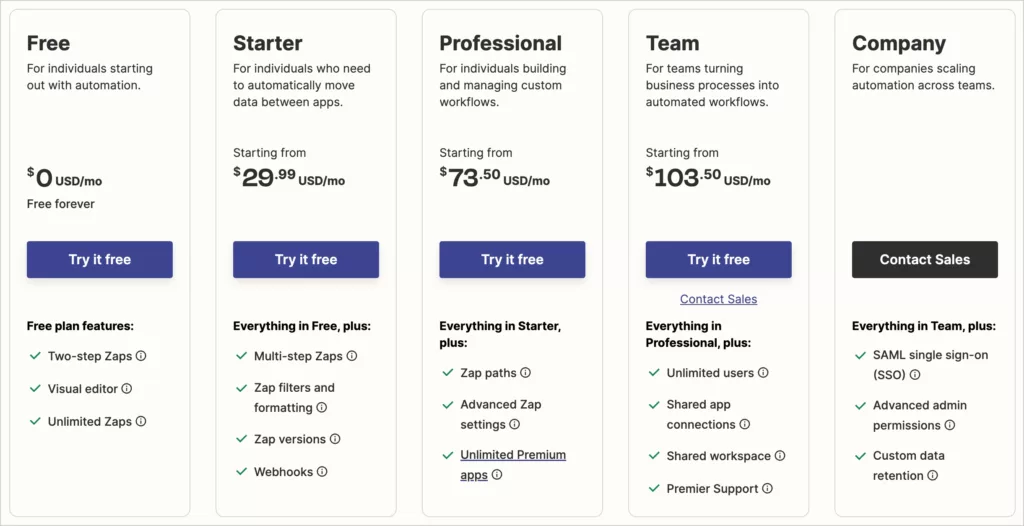
Zapier has many pricing options. They have five tiers for their workflow automation plans. They have two pricing options for each tier: a cheaper yearly payment or a more expensive monthly subscription. Below are screenshots for comparison.
Pay yearly
Pay monthly
Pricing Summary
| Plan | Yearly Pricing | Monthly Pricing | Zaps | Premium Apps | Users | Update Time |
| Free | $0 | $0 | Two-step | 0 | 1 | 15 min |
| Starter | $19.99 | $29.99 | Multi-step | 3 | 1 | 15 min |
| Professional | $49 | $73.50 | Multi-step | Unlimited | 1 | 2 min |
| Team | $69 | $103.50 | Multi-step | Unlimited | Unlimited | 1 min |
| Company | Inquire | Inquire | Multi-step | Unlimited | Unlimited | 1 min |
This table covers the basics, but please see Zapier’s pricing page for the most recent information and details.
Pros & Cons
Automation can be a double-edged sword, so let’s break down Zapier’s pros and cons.
Pros
- Easy-to-use interface, no coding skills required
- Vast app library, compatible with 5,000+ web apps
- Streamlines workflows and saves time
- Customizable for highly-tuned automation
Cons
- Limited functionality on the free plan
- Can be pricey for larger teams or heavy users
- Steeper learning curve for complex Zaps
- Some app integrations may require tweaking
- Some apps offer disappointing integration features
Who Zapier is best for
- Small businesses looking to automate repetitive tasks
- Freelancers juggling multiple projects and clients
- Remote teams aiming to improve communication and productivity
- Individuals seeking to create custom app integrations
Further Resources
To help you learn more about Zapier, check out these extras:
- Zapier Guides: Resources for using Zapier
- Zapier Community: Place for help documents and forums
- Zapier Blog: Stay up-to-date with tips, tricks, and news