No products in the cart.

TickTick is a task management tool to help you capture, organize, and act on your to-dos and habits. This guide will explore the basics of the productivity app, popular features, pricing, and alternative competitors. Learn the essentials of TickTick here.
What is TickTick?
TickTick is a versatile task management and productivity app designed to help individuals and teams capture, organize, and prioritize tasks. It acts as a digital to-do list but is far more than just a basic checklist.
It offers a centralized platform for all your task management needs, integrating time management, collaboration, and productivity tools in one solution.
Why Use TickTick?
Choosing the right productivity tool can transform your workflow. Here are the top five reasons why you should consider TickTick:
- All-in-One Task Manager: It’s a comprehensive solution that offers task management, calendar integration, reminders, and a Pomodoro timer. With it, you can manage almost every aspect of your productivity cycle.
- Intuitive User Experience: User-friendliness is at the heart of TickTick. Its clean and minimal design ensures new users can quickly adapt and start creating tasks without a steep learning curve.
- Versatility Across Platforms: Whether you’re on your desktop, using the Chrome extension, or the mobile app, TickTick is compatible. It provides device synchronization, ensuring you always have your tasks and lists at your fingertips.
Top Features
If you’re someone who has key feature requirements, give this section a browse. We’ve highlighted some of our favorites for easy reference.
Calendar
TickTick’s calendar view helps you visualize your tasks over the day, week, month, and longer. You can get precise with how long you think tasks will take and organize your day effectively using its intuitive schedule layout.
Cross-platform support
TickTick is available on everything you’ll need, including Windows, macOS, iOS, Android, Linux, and even Apple Watch. This means not only can you use it regardless of your preferred device stack, but it’s also cross-functional across them. For instance, you can add a task on your iPhone, then manage it on your PC. Great for future-proofing your technology options.
Collaborative Lists
Ever want to create a to-do list you can share with others, like a family shopping list? TickTick makes that easy. You can make collaborative lists with it and manage key tasks with others.
This becomes especially helpful when combined with the cross-platform support, as anyone should be able to use the app regardless of what devices they use.
Pomodoro Timer
Adopt the Pomodoro Technique directly within TickTick. Break your time into intervals to promote sustained concentration and stave off burnout.
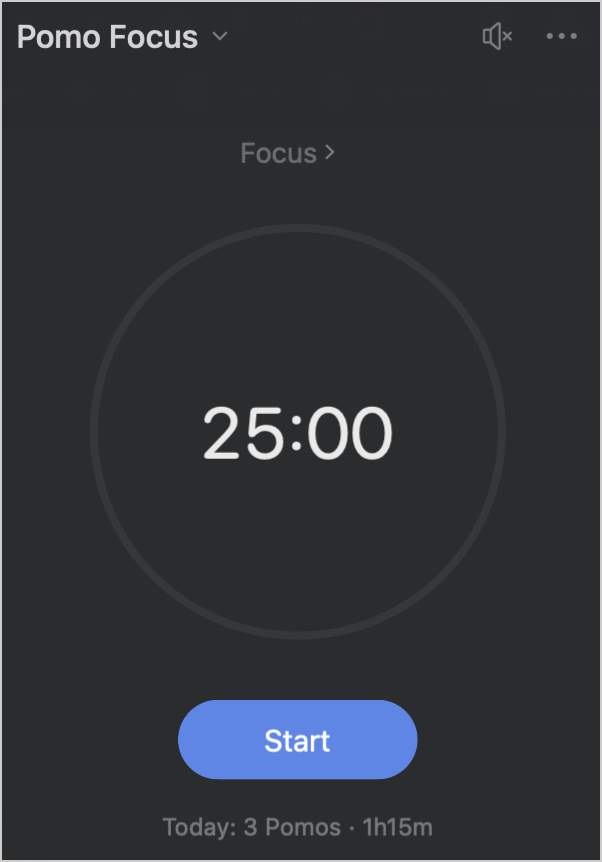
TickTick offers great integration with this feature, allowing you to link Pomo timers to tasks and habits. This can give you even more insight into your focus time.
Habit Tracker
TickTick offers a top-notch habit-tracking feature that helps you build and maintain positive routines. You can easily customize your habits and get important data, including streaks and additional notes for each session.
In-Line Task Management
With TickTick, you can easily add and manage data about your tasks while writing them.
For example, their Smart Recognition feature makes it easy to include due dates by typing “today” or another date:

This also recognizes tags, priorities, and categories using simple shortcuts.
Chrome extension
TickTick offers a Chrome extension for adding and managing tasks in the browser.
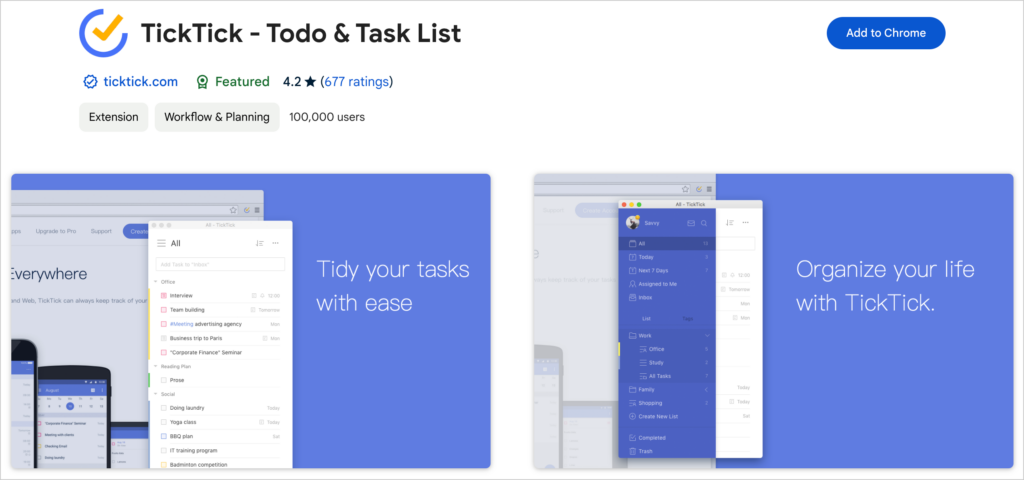
This allows you to add and bookmark webpages to your lists, a great feature for noting and saving articles for later.
Integrations with popular apps
It’s a task manager that offers integrations with other task and product management software. This means you can streamline your workflows and add app automation:
If you like simplifying your workflows, we highly recommend experimenting with these integrations and combining them for maximum efficiency.
Apple Watch Support
For Apple Watch users, TickTick offers sleek support for the smartwatch. With it, you can add new to-do items from your wrist or get notifications from the app.
While this isn’t a must for most users, it does offer added convenience and usability bonuses.
Pricing
TickTick offers both a free version and a premium subscription, making it accessible to casual and power users alike.
Free Version
The free version is pretty dang generous to start. While there are some limitations, it allows you to perform the most common and essential functions, like adding and organizing tasks, tracking habits, seeing stats on your productivity, and nerd out, etc.
Premium Subscription
For those who want to use TickTick to its full potential, the premium subscription provides enhanced features, including:
- All calendar features: While the free option offers calendar support, the Premium version lets you manage your tasks in more detail and sync with third-party calendars, such as Google or Outlook.
- Filter feature: View your tasks with greater precision, filtering by priority, category, tag, or whatever else you’d like.
- Track changes: See what’s been updated with tasks. Great for task management across teams, so you can get info on changes without having to Slack someone.
- Progress tracking: Get Historical Statistics to help you understand what kind of work is being done. Track time entered, types, and other key stats.
- Premium themes: While TickTick already has a slick interface, the premium themes add a nice touch. Not essential by any means, but if you’re gonna open it several times a day, might as well have it look the way you want, eh?
The cost of TickTick Premium varies by region, but it generally offers monthly and annual subscription options, with the annual plan being more cost-effective.
Current Price: $35.99/year
Please double-check this on their upgrade page to ensure the most accurate results. Also, watch for promotions like Black Friday and other holiday sales.
Do I need TickTick Premium?
If you’re looking for a great cross-functional task management app, the free version should be fine for most of your needs. While the premium version offers nice additional features, they aren’t essential for most task-creation and organization tasks.
However, TickTick Premium is relatively affordable at less than $40 per year. If you find yourself using it constantly or pining for those shiny functionalities, they’re likely worth the cost. And yes, it’s OK if you just want to upgrade for the themes.
TickTick Alternatives
Regarding task management and productivity tools, there are several other options, each with unique features and strengths. Try these out if you’re considering a different task management tool.
- Todoist: A robust task management tool known for its clean interface and advanced task categorization features. It offers natural language input, and Karma points to gamify productivity.
- Reminders: Apple’s built-in task manager for its devices. It’s straightforward and integrates seamlessly with other Apple apps. It’s ideal for those who want a basic, no-frills task manager that syncs across their Apple devices.
- Microsoft To Do: This tool is integrated with other Microsoft products, making it an excellent choice for those deeply embedded in the Microsoft ecosystem.
- Any.do: A comprehensive task manager with a calendar, reminders, and a daily planner, offering a simple interface for those wanting to merge to-do lists and calendar events.
- Things: Exclusively for Apple users, this premium task manager is known for its intuitive design and powerful task management features.
Choosing the right tool largely depends on your needs, the desired integrations, and the preferred user experience. It’s always a good idea to test a few options and see which aligns most closely with your workflow.
Bottom Line
TickTick is a fully-featured to-do list app. Is it an essential platform to check out for those looking to optimize their productivity and time management.