No products in the cart.

Webflow has grown into one of the most popular modern website builders because it bridges visual design tools and full-scale web development. It gives designers, freelancers, and businesses the freedom to create custom, professional websites without writing code, while still offering far more control than traditional drag-and-drop platforms.
If you want a website builder that’s visually intuitive but powerful enough to scale with your needs, Webflow sits right in that sweet spot. This guide breaks down what Webflow is, who it’s best for, and how it compares to alternatives.
What is Webflow?
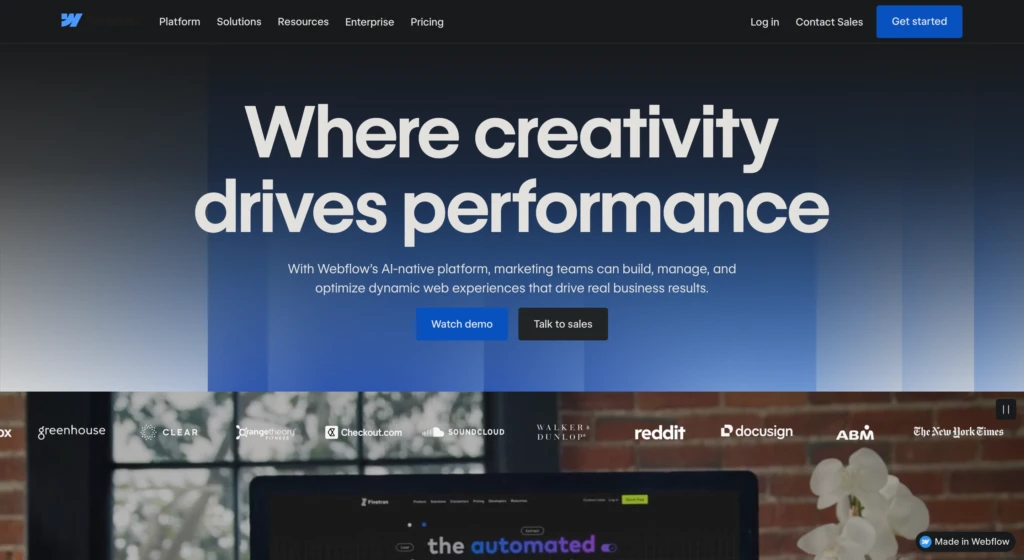
Webflow is a fast-growing website builder that blends drag-and-drop simplicity with professional-grade customization. Its design-first approach has made it a favorite among modern businesses, designers, and agencies who want more control without diving into code.
For people who understand the basics of website layout and design, Webflow’s interface is intuitive and powerful, offering an accessible way to create custom websites without writing code.
Who is Webflow Best For?
Webflow appeals to people who want more control than alternative website builders like Wix or Squarespace can provide, but who may not want to dive into the technical complexity of WordPress. It is a strong fit for:
- Designers who want pixel-level customization without relying on developers
- Agencies and freelancers who need to create polished client sites quickly
- DIY business owners who want more flexibility than template-driven platforms
- Small businesses and startups that need a professional site without building from scratch
It is especially useful for those who prefer a visual-first approach to building websites while still having access to advanced customization when needed.
Pros & Cons
Every website platform has trade-offs. Webflow is no exception, and weighing its strengths and weaknesses will help you decide whether it matches your goals.
Pros
- Intuitive interface: Easy to grasp if you know basic web layout principles
- Educational resources: Webflow University offers tutorials, courses, and projects that are both thorough and entertaining
- High customization: Provides more flexibility than traditional drag-and-drop builders
- Visual-first workflow: Great for those who value design but don’t want to code from scratch
- Good for collaboration: Teams can work together effectively on shared projects
Cons
- Learning curve: Beginners with no design or web knowledge may find it overwhelming
- Less extensible than WordPress: Limited ecosystem of plugins and third-party integrations compared to open-source platforms
- Pricing: Higher than entry-level platforms like Wix or Squarespace, especially for advanced features
- E-commerce limitations: Works for small shops, but is not as robust as Shopify for larger catalogs
Pricing Overview
Webflow offers tiered pricing for both general websites and e-commerce sites:
Plans
- Starter: Free, highly limited option for curious new customers
- Basic plan: Solution for simple websites without a Content Management System (CMS)
- CMS plan: Adds content management for blogs or dynamic pages
- Business plan: Scales up for higher traffic and more features
- E-commerce plans: Options for small, medium, and larger online stores
Pricing Table
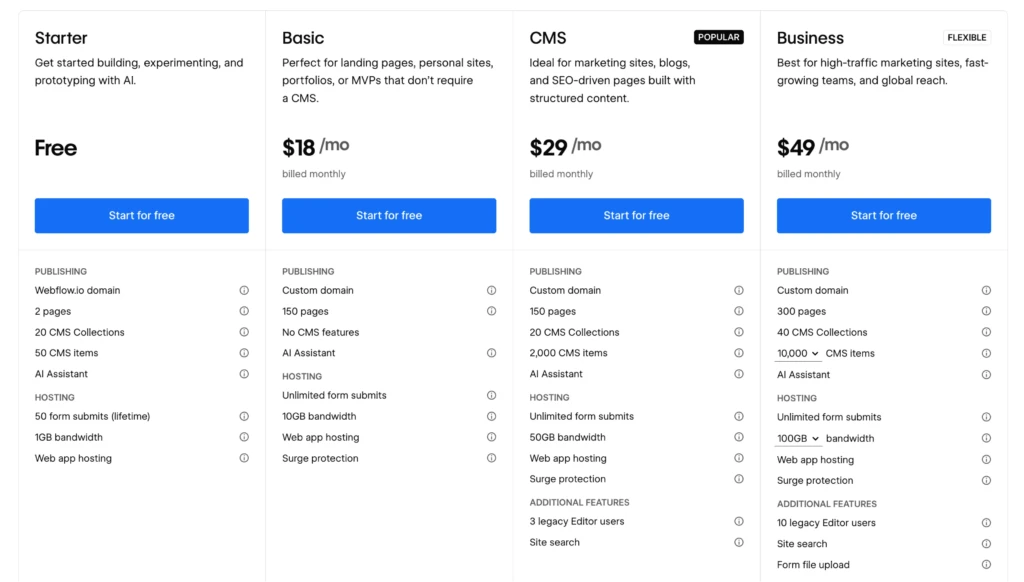
Here’s a clear breakdown of Webflow’s Site Plan pricing from their official pricing page:
| Plan | Price/mo (Monthly) | Price/mo (Yearly) | Pages | CMS Collections | CMS Items | Bandwidth |
|---|---|---|---|---|---|---|
| Starter | Free | Free | 2 | 20 | 50 | 1 GB |
| Basic | $18 | $14 | 150 | None | N/A | 10 GB |
| CMS | $29 | $23 | 150 | 20 | 2,000 | 50 GB |
| Business | $49 | $39 | 300 | 40 | Up to 10,000+ | 100 GB+ |
| Enterprise | Custom | Custom | Custom | Custom | Custom | Custom |
Below are screenshots of their current pricing plans:
Monthly Pricing
Webflow charges higher rates for monthly subscriptions, a common pricing model.
Yearly Pricing
Annual subscriptions provide more value for the cost, but you have to pay for the year up front. This is great if you’re committed to building on the platform, put can be prohibitive if testing it out.
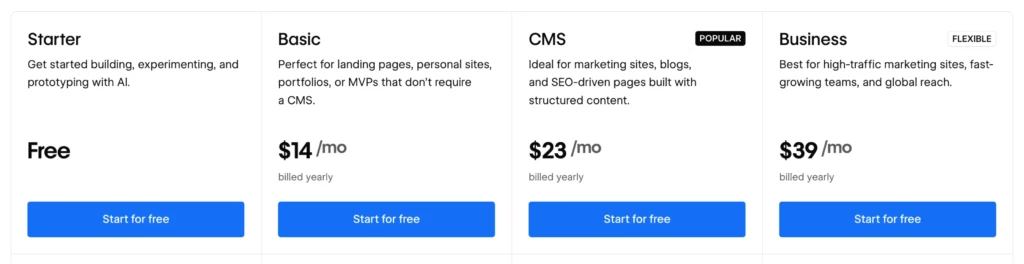
Overall, Webflow’s pricing is higher than entry-level builders but provides significantly more flexibility, making it cost-effective for businesses that value design freedom.
Alternatives to Webflow
If you are exploring website builders, it’s worth considering how Webflow compares to other competitors:
- Wix: Known for ease of use and quick setup. Best for individuals or small businesses that need a simple site. Less flexible than Webflow but cheaper.
- Squarespace: Strong design templates and good for visually-driven businesses like photographers or restaurants. Limited customization compared to Webflow.
- WordPress: The most widely used CMS. Extremely flexible with a huge plugin ecosystem, but often requires more technical knowledge or developer support.
- Shopify: Built specifically for e-commerce. Better suited to stores with larger product catalogs, though less flexible for non-commerce sites.
Each platform has its strengths, but Webflow sits in the middle ground between easy drag-and-drop builders and highly technical CMS systems.
Is Webflow Good for SEO?
Yes, Webflow has solid SEO features, especially compared to most visual website builders, offering direct control over technical SEO elements and clean code.
Unlike many drag-and-drop platforms that limit your ability to adjust technical details, Webflow provides direct access to the key elements that influence how search engines index and rank your site.
However, more complex solutions like WordPress can provide even more SEO control and flexibility.
Built-in SEO Features
- Clean, semantic code: Webflow automatically generates well-structured HTML and CSS, helping search engines understand your site’s content.
- Custom meta fields: You can easily edit page title tags, meta descriptions, and Open Graph settings without installing plugins.
- Alt text and accessibility controls: Every image and element can have descriptive alt text, improving SEO and usability.
- Sitemap and robots.txt: Webflow automatically creates and updates your sitemap and lets you customize your robots.txt file to control web crawlers.
- Redirect Management: A native redirect manager makes it simple to create 301 redirects, maintaining SEO value when you restructure your site or change URLs.
Performance and Technical SEO
- Fast hosting with CDN: Webflow sites are served via Amazon Web Services and Fastly CDN, which typically result in fast load times worldwide.
- Automatic SSL certificates: Every Webflow project comes with HTTPS, which is a Google ranking signal and a trust factor for users.
- Mobile responsiveness: Webflow’s design system makes it easy to build responsive layouts, ensuring your site is mobile-friendly.
- Core Web Vitals optimization: Page speed and interactivity can be refined through Webflow’s performance settings, and sites often score well on Google Lighthouse tests with proper setup.
Structured Data and Advanced Options
- Custom schema markup: Webflow lets you add structured data (JSON-LD) directly in the project’s head or in specific page settings. This enables rich results for products, reviews, events, and more. However, the implementation requires manual setup and testing, which may be challenging for beginners.
- Canonicals: Canonical tags help search engines determine where to provide credit for certain topics and content. These tags can be set manually in Webflow to avoid duplicate content issues.
- Custom code embeds: For businesses that want even deeper SEO control, custom snippets (e.g., tracking, A/B testing scripts) can be added without breaking the site.
SEO Drawbacks
- Limited high-end customization: Webflow offers fantastic support for most use cases, but if you want to fully trick out a page or feature, you’ll need to work around and use hacks. Alternatively, you can limitlessly customize a WordPress theme with whatever code you’d like, so long as you have the development skills, resources, and patience required.
- No plugin marketplace: Unlike WordPress or Shopify, Webflow does not have a vast ecosystem of plugins. Most optimizations must be managed natively or via third-party integrations. However, Webflow’s native support is much better for most SEO needs than WordPress out of the box.
- Learning curve for advanced tactics: While Webflow covers the essentials, implementing advanced SEO strategies (such as complex schema, international SEO, etc.) often requires technical knowledge.
SEO & Webflow Summary
For most small businesses, freelancers, and design-focused teams, Webflow offers everything needed to launch a site that performs well in search results.
It combines strong technical foundations with the flexibility to customize advanced elements. The key limitation is that it lacks the plugin ecosystem and full development control offered by WordPress, so highly specialized SEO tasks may require more nuanced work.
Getting Started with Webflow
If you are curious about Webflow, the best way to evaluate it is to test it directly and build as you learn. Here’s a practical learning path to follow:
- Sign up for a free plan. Start by creating a free Webflow account. Explore the dashboard, get a feel for the interface, and try out how sites are structured. Even experimenting with a simple two-page site will help you understand whether the workflow feels natural.
- Experiment with building a basic site. Use the free tools to set up a simple project. This hands-on step will show you how pages, elements, and the visual editor connect. It is the quickest way to know if Webflow’s system clicks with how you like to work.
- Move into beginner tutorials. Once you have tried building, check out starter content from Webflow University or their YouTube channel. These resources walk you through layouts, CMS basics, and common workflows.
- Build toward your actual needs. Start applying what you have learned to the type of site you actually want to build, such as a business site, portfolio, or e-commerce store. Use Webflow’s reference docs to guide you through features that match your goals.
If you follow this outline, you can move from curiosity to evaluation, learning as you go and grounding your decision in hands-on experience.
Further Resources
If you are considering Webflow or starting to learn how to use it, there are a number of high-quality resources available to guide you:
- Webflow University: Webflow’s official learning platform. It offers step-by-step tutorials, video courses, and guided projects covering everything from building your first page to advanced design techniques. The content is beginner-friendly but also dives into advanced concepts, making it a go-to resource whether you are just starting or refining your skills.
- Webflow Showcase: A gallery of real websites created with Webflow. You can browse by category, see how other designers structure their sites, and even clone certain projects to use as a starting point. It is one of the best ways to spark inspiration and learn design techniques by studying live examples.
- YouTube Channel: Webflow’s official channel has strong tutorials and community content. Their videos often cover practical workflows and real-world problem-solving. You can also search “Webflow” on YouTube for a wealth of useful videos.
- Webflow Forum: The official forum is active with designers, developers, and business owners. You can ask questions, share projects, and find solutions to issues not covered in tutorials.
- Independent reviews: Platforms like G2, Capterra, and TechRadar provide unbiased evaluations of Webflow’s strengths and weaknesses. These are useful if you want to see how Webflow stacks up against competitors from a third-party perspective.
Summary
Webflow is a website builder that balances ease of use with professional-grade flexibility. It stands out for its intuitive interface, strong design focus, and excellent educational resources, making it a great choice for designers, freelancers, and business owners who want more control. Its pricing is higher than that of basic site builders but more accessible than custom development, and it offers solid SEO tools.
That said, Webflow is not without trade-offs. Beginners may find the learning curve steep, and its ecosystem is smaller than that of WordPress or Shopify.
The best way to know if it fits your needs is to test it directly. Sign up for a free plan, try building a simple site, and see how it aligns with your goals. With some hands-on exploration, you can quickly decide whether Webflow is the right platform to power your project.