No products in the cart.
ChatGPT has transformed how millions of people interact with artificial intelligence, offering a conversational interface that can assist with everything from drafting emails to debugging code.
Developed by OpenAI, this advanced language model uses deep learning to understand prompts and generate remarkably human-like responses. While it offers impressive capabilities, including multilingual support, contextual understanding, and versatile applications across industries, it also comes with limitations worth understanding.
This guide explores how ChatGPT works, its key features, advantages and drawbacks, and best practices for getting the most out of this powerful AI tool.
What is ChatGPT?
ChatGPT is an artificial intelligence language model that can generate human-like responses to a wide range of prompts.
It is one of the largest and most advanced language models, with hundreds of billions of parameters, enabling it to understand and generate natural language with remarkable accuracy.
How Does ChatGPT Work?
ChatGPT is based on a type of AI known as deep learning. Specifically, it uses a transformer network, a type of deep learning architecture that processes data sequences, such as words in a sentence.
When ChatGPT receives a prompt, it analyzes the input’s words and phrases to infer its most likely meaning. It then generates a response that matches the tone, style, and content of a human-generated response.
ChatGPT Features
- Large Vocabulary: It has been trained on a large-scale dataset of words and phrases, enabling it to generate responses to a wide range of prompts.
- Contextual Understanding: ChatGPT uses context to infer the meaning of an input and generate appropriate responses. This allows it to generate more accurate and relevant responses than simpler language models.
- Multilingual Support: It can generate responses in most major languages.
- Customizable: ChatGPT can be fine-tuned for specific use cases, such as customer service or social media engagement. This makes it a versatile tool for businesses and organizations looking to improve customer communication.
Pros & Cons
Pros
- Human-like responses: ChatGPT can generate text that resembles human-written content, making it well-suited for natural language processing tasks.
- Versatile applications: It can be used across domains such as customer support, content creation, translation, and more.
- Time-saving: ChatGPT can generate content quickly, reducing the time and effort required to manually create text.
- Continuous improvement: It is based on a constantly evolving AI model, meaning its performance and capabilities will likely continue to improve over time.
Cons
- Occasional inaccuracies: ChatGPT can sometimes generate content that is not entirely accurate or relevant to the provided context, requiring human intervention to correct or refine the output.
- Limited creativity: While it can generate human-like content, it lacks the critical thinking skills of a human writer.
- Dependence on training data: ChatGPT’s performance and capabilities are limited by the quality and scope.
- Privacy concerns: The company can view your prompts (unless you turn off history), raising privacy and security concerns about your submitted information. Be careful with what you ask and what information you include.
Keyboard Shortcuts
Here’s a preview of ChatGPT’s main shortcuts:
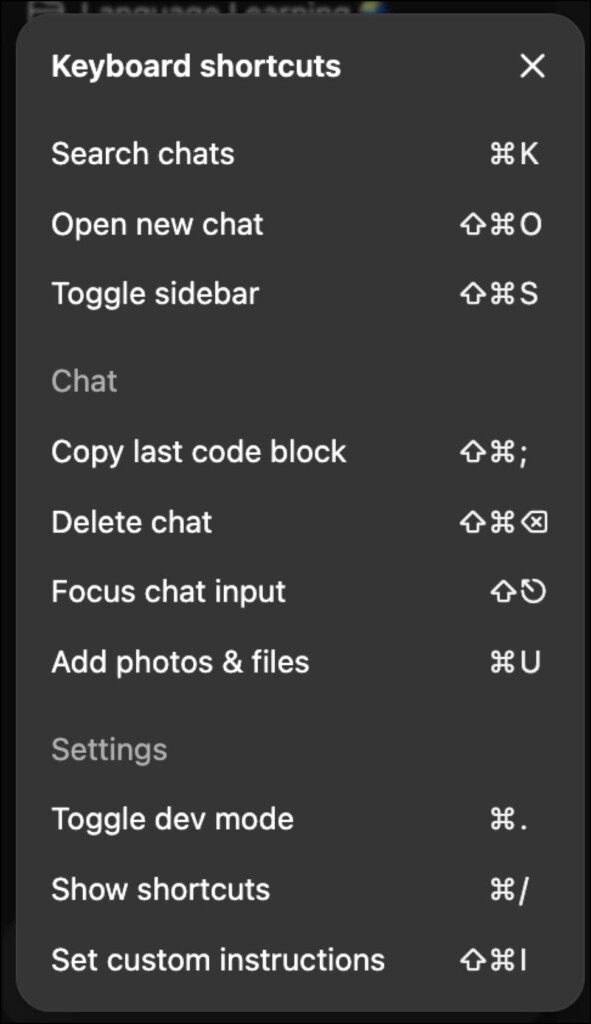
To view them in ChatGPT, use Cmd + / or click on the question mark icon at the bottom-right, then Keyboard shortcuts. Here are the current options available:
| Function | Keyboard Shortcut |
|---|---|
| Search chats | Cmd K |
| Open new chat | Shift Cmd O |
| Toggle sidebar | Shift Cmd S |
| Copy last code block | Shift Cmd ; |
| Delete chat | Shift Cmd Del |
| Focus chat input | Shift Back |
| Add photos & files | Cmd U |
| Toggle dev mode | Cmd . |
| Show shortcuts | Cmd / |
| Set custom instructions | Shift Cmd I |
Best Practices
While the software is incredibly powerful, it still needs solid instructions. Try these techniques with your next prompts.
- Ask ChatGPT what it wants! This is a great way to get started whenever you have a new or complex task. If you don’t know the requirements, chances are it will, and can guide you to better results.
- Write specific prompts. While the AI can figure out plenty pretty easily, it still needs context and clarity. Tell ChatGPT your goals and what you expect from the result. This simple step should guide a smoother process.
- Keep a prompt library. Spent tons of time crafting the perfect request? Save it for reference and further edits later. I recommend a tool like Notion to store your prompts in a dynamic, easy-to-organize database. (Or get an AI prompt library template to get started.)
For more, see OpenAI’s official GPT guidelines.
Who is ChatGPT best for?
Nearly everyone and anyone. It is an incredibly powerful tool that enhances communication and saves countless hours of work. Use it however you can, but be careful with what information you provide. Build something great with it.